
It’s the first heat wave of July. Your phones should be ringing, but your ad money is going into Facebook posts about your new service van.
Meanwhile, homeowners in Cherry Hill are typing “AC repair near me” into Google and calling whoever shows up first.
Facebook ads and Google Ads both work for local service businesses. They just do different jobs, and putting money on the wrong one for the moment you’re in is one of the fastest ways to waste an ad budget.
Quick answer
Use Google Ads to reach people already searching for your service, especially for urgent jobs like repairs and emergencies. Use Facebook and Instagram ads to put your work in front of local people before they search, especially for planned, visual jobs like remodeling and landscaping. Judge both by cost per booked job, not cost per click or cost per lead.
This is ThinkDMG’s rule of thumb. The platform facts below are sourced.
Searching vs. scrolling: the one difference that matters
Everything else about these two platforms follows from one fact.
On Google, the person is searching. They typed “roof repair Cherry Hill” or “emergency plumber Voorhees” because they have a problem now. Your ad shows up at the moment they’re looking. Your job is to be there and make calling you easy.
On Facebook and Instagram, the person is scrolling. They weren’t thinking about you a second ago. Your ad has to stop them with something worth seeing: a finished patio, a before-and-after kitchen, a crew they’d trust in their house.
That’s why the same ad rarely works on both. A Google ad says “Cherry Hill AC Repair. Same-Day Service. Call Now.” A Facebook ad shows the work and tells a short story. Copy written for one platform falls flat on the other.
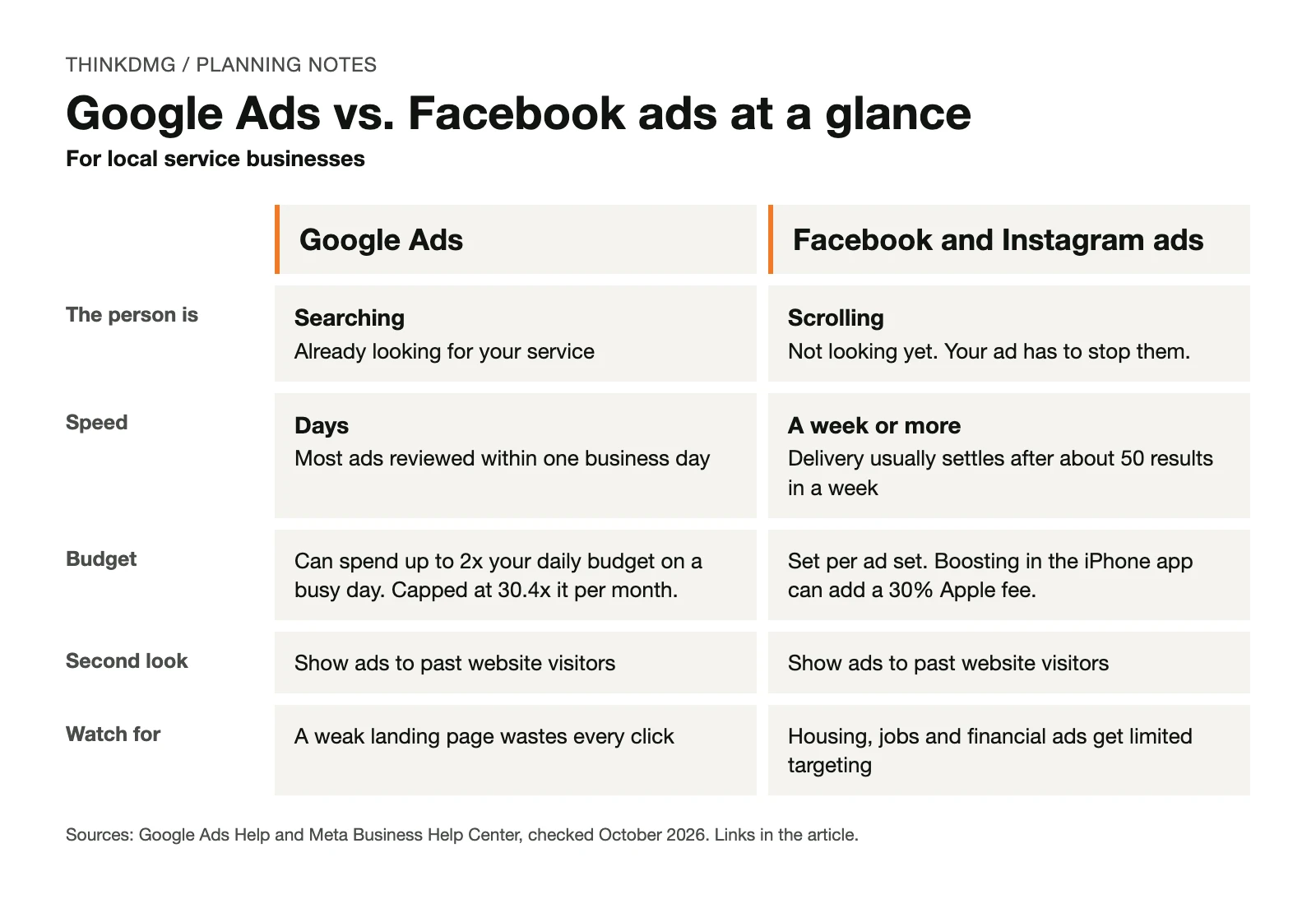
Side by side
| Google Ads | Facebook and Instagram ads | |
|---|---|---|
| The person is | Searching for a service | Scrolling a feed |
| How fast it starts | Google reviews most ads within one business day | Meta says delivery usually settles after about 50 results in a week |
| What you need | A page that matches the search, and someone who answers the phone | Strong photos or short video, and a simple offer |
| Fits best (ThinkDMG guidance) | Urgent and high-intent services: HVAC repair, plumbing, roofing leaks, legal, medical | Planned, visual services: remodeling, landscaping, painting, hardscaping |
| Showing ads again to past visitors | Yes, through “your data” segments | Yes, through website Custom Audiences |
Sources for the factual rows are listed at the end. The “fits best” row is our judgment.
What each one costs, and how to find your real number
You’ll see cost-per-click ranges quoted all over the internet. We left them out on purpose. Click prices change by service, town, season and competitor, so a national range tells you little about your market.
Here is what you can count on, straight from the platforms:
- Google Ads budgets are monthly in practice. Google can spend up to twice your average daily budget on a busy day, but won’t charge more than 30.4 times that daily amount in a month, according to Google’s budget rules.
- Google shows you local estimates. Keyword Planner gives monthly search estimates and the average cost to show up for a keyword, per Google’s Keyword Planner guide. You’ll need a Google Ads account with billing set up to use it.
- Boosting from your phone can cost more. Meta says Apple can take a 30% fee when you boost a post from the Facebook app on an iPhone or iPad. Boost from a computer, per Meta’s boost guide.
Meet Example Comfort HVAC: the cheap lead that cost more
Example Comfort HVAC is fictional: the company, its costs and every rate. It’s here to show the method, not typical results.
Example Comfort HVAC serves Camden County. It sells two very different things: AC repair, which people need today, and ductless mini-split installs, which people plan for weeks.
Last summer the owner ran both platforms and compared what she paid per lead. Facebook looked like the easy winner:
| Fictional numbers | Google Ads (AC repair) | Facebook ads (AC repair) |
|---|---|---|
| Cost per lead | $20 | $5 |
| Share of leads that booked a job | 50% | 10% |
| Cost per booked job | $20 ÷ 50% = $40 | $5 ÷ 10% = $50 |
The $5 lead was cheaper to get and more expensive to turn into work. Most of those Facebook leads were people who liked the post and weren’t ready for a repair. The Google leads had a broken AC and called right away.
So she split the work by what each platform is good at:
- AC repair → Google Ads. Urgent, searched for, booked fast.
- Ductless installs → Facebook and Instagram ads. Photos of clean installs, shown to local homeowners months before the next heat wave.
- Both → a second look. People who visited the install page but didn’t call see a follow-up ad later.
The lesson isn’t that Google always wins. It’s that cost per lead hides the number you actually care about: what you pay for each booked job. To work out your own limit, read how much you can afford to pay for a lead.
Two Facebook rules local owners trip over
The learning phase needs volume
Meta’s system learns who to show your ads to by watching results. Meta says an ad set usually leaves its “learning phase” after about 50 results in the week after its last major edit. Edits can restart it.
A small local budget often can’t produce 50 leads a week. That doesn’t mean Facebook won’t work for you. It means you should keep the number of ad sets small, avoid editing them every few days and give the system time. Our guide to choosing between SEO, Google Ads and social media walks through that math with an example.
Some ads get limited targeting
If your ad is about housing, jobs or financial products and services, Meta requires you to pick a Special Ad Category. For advertisers in or reaching the U.S., Meta limits or removes age, gender and ZIP code targeting for those ads, according to Meta’s Special Ad Category guide.
That matters for real estate, mortgage, rental, hiring and lending ads. If you run any of those, check the category before you build an audience. Choosing the wrong one can get your ads rejected.
Should you run both?
Yes, once one platform is working and you can afford to fund a second one properly. Before that, splitting a small budget usually means neither gets enough to show you anything.
When you do run both, give each its own job:
- Google Ads catches people searching right now.
- Facebook and Instagram ads build familiarity in your service area before people need you.
- Retargeting on either platform brings back people who visited and didn’t call. Google calls this “your data” segments. Meta uses website Custom Audiences built from the Meta Pixel.
Send each ad to the page for that service, not your home page. A person who searched “water heater replacement” should land on a page about water heater replacement.
Five mistakes we’d fix first
| Mistake | What it costs you | The fix |
|---|---|---|
| Same ad copy on both platforms | Search ads that read like posts, posts that read like search ads | Write for searchers on Google and scrollers on Facebook |
| Judging Facebook on Google’s timeline | You stop before the ads settle | Set a review date after the learning phase |
| Comparing cost per lead | You fund the cheaper lead, not the cheaper job | Track leads to booked jobs |
| Sending ads to the home page | People can’t find what they searched for | One page per service |
| Boosting posts from the iPhone app | A 30% Apple fee on top, when it applies | Boost from a computer |
Which should you start with? A quick checklist
- ☐ People in my area search for my service. (Check Keyword Planner.) → Google Ads
- ☐ Customers usually need me within a day or two. → Google Ads
- ☐ My work looks great in photos or short video. → Facebook and Instagram
- ☐ Customers plan for weeks or months before they buy. → Facebook and Instagram
- ☐ I have a page for each service I advertise. → needed for both
- ☐ Someone answers every lead quickly and I track which ones booked. → needed for both
More checks in the Google column? Start there. More in the Facebook column? Start there. If you’re missing either of the last two, fix those first. This checklist is ThinkDMG guidance, not a guarantee.
What to do this week
- Split your services into “people need it now” and “people plan for it.”
- Look up your top two services in Keyword Planner and note the monthly searches.
- If you boost posts, switch to boosting from a computer.
- Pull last season’s leads and mark which ones booked, by platform.
- Work out cost per booked job for each platform you ran.
Free tool: get a written ad plan
Answer a few questions about your business, goal and budget. The Paid Advertising Planner shows which paid options fit and the gaps to fix before launch. No account needed.
Questions owners ask about Facebook and Google Ads
Which is cheaper for a local service business?
It depends on what you count. Facebook leads can cost less, but if fewer of them book, the job costs more. Compare cost per booked job, using your own numbers.
How long before I see results?
Google reviews most ads within one business day, so search ads can start bringing calls within days. On Facebook, plan to wait until your ad sets leave the learning phase before judging them, which takes about 50 results in a week.
Can I target by age and income on Facebook?
For housing, employment and financial ads, Meta limits age, gender and ZIP targeting in the U.S. For other ads, the options change often. Check what Ads Manager shows you today rather than relying on an old guide.
Do I need a separate landing page for each platform?
You need a page for each service. The same service page can work for both, as long as it matches what the ad promised.
Is Google’s Local Services Ads the same as Google Ads?
Not quite. Local Services Ads are available only for certain service categories, and you pay per lead instead of per click, according to Google’s Local Services Ads guide. Google is also moving them into Google Ads. The move started in August 2026 for select U.S. home and storefront service advertisers and expands in late 2026, per Google’s transition notice. You still pay per valid lead after the move. Ask whoever manages your ads which setup you’d be on.
Next step: a free First-Dollar Review
Bring the checklist above, last season’s leads (with which ones booked) and your monthly budget. In a free First-Dollar Review (our free marketing consultation), ThinkDMG will tell you which platform should get your first dollar and what to fix before you spend it. Request your First-Dollar Review.
ThinkDMG manages Google Ads and social media advertising for local businesses across South Jersey and Greater Philadelphia.
Sources
- Google Ads Help: About the ad review process. Most ads reviewed within one business day.
- Google Ads Help: About average daily budgets. Up to 2x daily budget on a day; capped at 30.4x per month.
- Google Ads Help: Use Keyword Planner. Monthly search estimates and average cost; requires account setup with billing information.
- Google Ads Help: About your data segments. Show ads to past website visitors.
- Meta Business Help Center: About the learning phase. About 50 results in the week after the last significant edit.
- Meta Business Help Center: How to choose a Special Ad Category. Limited age, gender and ZIP targeting for housing, employment and financial ads in the U.S.
- Meta Business Help Center: Boost a post. Apple’s 30% service fee on boosts bought in the iOS app.
- Meta for Developers: Custom Audiences. Group website visitors by actions taken on your site.
- Local Services Help: Getting started with Local Services Ads (U.S.). Certain service categories only; pay for leads.
- Google Ads Help: Local Services Ads transition to Performance Max campaigns with pay-per-lead goals. Phased move starting August 2026; still pay per valid lead.
About the numbers: Example Comfort HVAC and its costs and booking rates are fictional. Platform facts were checked against the sources above in October 2026.
