Tailored digital marketing guidance for small businesses. Discover cost-effective strategies to compete with big brands, engage your local community, and grow your digital footprint.
A contractor growth plan needs both delivery capacity and a defensible acquisition allowance. Passing one test does not make the other disappear.
It is possible to model enough contribution to support acquisition spending and still ask a crew to deliver more work than its calendar allows. It is also possible to have open crew-days but too little contribution left after delivery and estimate costs to support the proposed budget.
Use the Contractor Estimate-to-Job Planner → to keep those questions side by side. All figures below are a fictional USD scenario, not contractor benchmarks.
First, compare the goal with available crew-days
An owner wants ten jobs in one planning period. Each job requires three crew-days, and 24 crew-days are available after existing work.
The goal requires 10 × 3 = 30 crew-days. Capacity is floor(24 ÷ 3) = eight jobs. The ten-job goal therefore exceeds capacity by two jobs and six crew-days. This is a warning to resolve before buying demand, not a recommendation to shorten jobs or overbook.
Define crew-days consistently. If “one crew” changes size between jobs, or a specialty worker is the bottleneck, revisit the unit. A single average cannot show trade sequencing, weather interruptions or every job’s schedule.
AI-generated editorial illustrations; not photographs of a client engagement.
Then separate contribution, estimates and marketing
Each fictional job brings USD5,000 revenue and costs USD3,000 in variable delivery expenses. That leaves USD2,000 contribution per job, or USD20,000 at the ten-job goal, before marketing and overhead.
Assume 50% of genuine inquiries reach a completed estimate and 25% of completed estimates become won jobs. Ten jobs imply 40 estimates and 80 inquiries. If each completed estimate costs USD50 and that cost is explicitly excluded from both delivery and marketing costs, estimate preparation adds USD2,000.
With a USD4,000 included marketing budget, remaining contribution is 20,000 − 2,000 − 4,000 = USD14,000. Overhead, taxes and any omitted expenses still need funding; USD14,000 is not net profit.
What is the modeled acquisition allowance?
Suppose the owner wants USD1,200 contribution retained per job, or USD12,000 across ten jobs. After the separately excluded estimates, the acquisition allowance is 20,000 − 12,000 − 2,000 = USD6,000. Dividing by the 80 modeled inquiries gives USD75 per inquiry.
The entered USD4,000 budget divided by those inquiries is USD50 per inquiry. It is a budget ratio, not evidence that inquiries can be bought at USD50. The USD75 allowance is a modeled threshold, not a market quote. Neither number overrides the eight-job capacity limit.
Avoid charging estimate preparation twice—or not at all
If estimate preparation is already in variable delivery cost, explicitly mark it included. The planner then uses zero incremental estimate cost rather than charging again. If it is excluded and unknown, leave it unknown. Contribution minus marketing alone can still appear as a labeled partial figure, but a complete remaining-contribution or allowance figure is unavailable.
Changing the cost definition to produce a more attractive allowance does not improve the business. Record what is included, use the same definition across scenarios and ask the responsible person to verify the missing cost.
Choose the constraint to resolve
If capacity is the constraint, compare a lower job goal or a separately funded crew scenario. If contribution is the constraint, inspect scope, cost inputs and retained contribution without assuming a price change will work. If stage rates are uncertain, review the inquiry-to-estimate-to-job method → before raising spend.
ThinkDMG’s home-services marketing work → is relevant when the operating assumptions are ready for a marketing conversation. A reviewed PPC plan → should use those assumptions rather than substitute a generic percentage of revenue.
Subtract commitments and a deliberate reserve, convert the remaining slots into whole appointments, then divide by appointments per new client.
Ten blank calendar spaces do not always mean room for ten new clients. An appointment may require several slots, and a new client may need several appointments within the planning period. Existing commitments and work held in reserve also matter.
The Appointment Business Growth Planner → makes those units explicit. It is a general planning tool for appointment-based businesses, not a scheduler, patient system or clinical capacity assessment. Use aggregated figures only.
Choose one period and one slot unit
State the planning period and define a slot. It could be a standard booking unit in your own schedule. Count total slots before subtracting committed work; record commitments separately. Add the reserve you intend to keep rather than assuming every unbooked moment is available to sell.
Next, enter slots per appointment and appointments per new client within that same period. The planner’s labeled operational default is one slot per appointment. A blank reserve uses a labeled zero, which is an input to review rather than a recommendation.
A fictional schedule
Suppose the period has 100 total slots, of which 60 are committed. The owner reserves another ten. Each appointment takes one slot, and each new client is planned for two appointments in the period.
Whole new-client capacity: floor(30 ÷ 2) = 15 new clients.
If each appointment instead requires two slots, appointment capacity falls to 15 and new-client capacity becomes floor(15 ÷ 2), or seven whole new clients. The spare appointment does not constitute another complete two-appointment client plan.
Attendance does not create more booking capacity
Now keep the original 15-client scenario and assume 80% attendance. Thirty bookings imply 24 attended and six unattended appointments on average. The schedule still reserved 30 bookings. The six modeled unattended visits are not six slots you can sell again in advance.
The model does not know whether the open times suit the services or clients involved. Check appointment length, room or equipment availability, staff coverage, preparation and cleanup, and any professional restrictions with the responsible people. If the business is a healthcare practice, this general worksheet does not establish clinical appropriateness or regulatory compliance.
Use the selected-client input to model a goal deliberately. If it is blank, the planner uses computed new-client capacity. A goal above capacity remains visibly over capacity; the tool does not silently turn it into a safe booking plan.
AI-generated editorial illustrations; not photographs of a client engagement.
Make a decision you can inspect
Save the period and unit definitions with the result, then place a proposed client pattern on a real calendar. Where costs and attendance are unknown, keep the economics unknown until someone supplies the evidence. Do not enter patient names or individual bookings to fill a gap.
For the visitor side of the process, ThinkDMG’s web-design services → connect naturally to an understandable appointment path. The planner tells you about your entered schedule, while the website helps explain the actual next step; neither proves new demand.
Define each sales stage, use compatible stage rates, and work backward one whole stage at a time from the jobs you want.
A dashboard total called “leads” does not tell you how many estimates the office must arrange or how many jobs a crew can deliver. A form submission, a genuine inquiry, a completed estimate and a won job are separate events. Planning is clearer when the counts stay separate.
The Contractor Estimate-to-Job Planner → models that path with your own rates or compatible historical counts. It does not inspect your CRM, qualify inquiries or predict advertising performance.
Agree on what the stages mean
Write down “genuine inquiry,” “completed estimate” and “won job” before calculating rates. Decide how duplicate calls, existing customers, unserviceable locations and estimates still awaiting a decision appear in your records. Keep the definitions useful to your business rather than changing them to make a ratio look better.
Use a compatible group and allow enough time for its estimates to close. Dividing jobs won this month by estimates completed this month can mix older wins with newer estimates. The planner cannot repair that cohort mismatch from three totals. If the groups do not match, label the rates as assumptions and reconcile records before treating them as measured.
A fictional ten-job plan
Suppose an owner selects a ten-job goal. The explicitly chosen inquiry-to-completed-estimate rate is 50%, and the completed-estimate-to-job rate is 25%.
The product of the two stage rates is 12.5%. That product describes the supplied rate assumptions, not the likelihood of any particular person buying.
The calculation rounds estimates upward before deriving whole inquiries. For a different fictional seven-job goal with a 30% estimate win rate and a 60% inquiry-to-estimate rate, it first needs ceil(7 ÷ 0.30) = 24 estimates, then ceil(24 ÷ 0.60) = 40 inquiries. Directly multiplying and rounding only at the end can describe a different workload.
Plan the office work as well as the crew work
Forty estimates are not merely a conversion statistic. Someone must handle their preparation and follow-up. Give the office an owner-defined plan for contact, scheduling, estimate completion and handoff. The Lead Follow-Up Planner → can document those responsibilities without sending messages or imposing an invented response deadline.
Then compare the goal with crew capacity. Ten won jobs at three crew-days each require 30 crew-days. If only 24 are available in the period, the modeled delivery capacity is eight whole jobs. The pipeline arithmetic can still show the ten-job goal, but it cannot make that goal fit.
AI-generated editorial illustrations; not photographs of a client engagement.
Read a gap as a question, not a diagnosis
If inquiries rise while completed estimates do not, check the definitions, service fit, contact completion and timing before blaming one channel. If estimates rise without wins, review scope, pricing, decision timing and record completeness. The rates alone cannot prove which factor caused the difference.
Likewise, an inquiry that does not become a job is not automatically waste. A person may be outside scope or still deciding. Do not turn this planning worksheet into an automatic negative-keyword or staff-performance judgment.
Put the next review on one page
Record the goal, period, stage definitions, source of each rate and owner for resolving missing evidence. Run the planner, then examine job contribution and crew capacity before raising spend →. For a separately reviewed advertising plan, ThinkDMG’s PPC services → are the relevant service connection. More spending is not the default answer to an unexplained stage gap.
Use contribution within a period you explicitly choose, subtract what you want to retain, and keep the resulting acquisition allowance separate from cash available today.
Revenue alone cannot show what a new recurring cleaning customer leaves for marketing. Delivery costs have to come out first. A recovery window can then help you explore acquisition spending, but choosing three months does not prove a customer will stay for three months or pay every invoice.
The Recurring Cleaning Growth Planner → lets you state the frequency, visit economics, recovery period and close rate yourself. It does not supply a typical cleaning lead price or estimate customer lifetime value.
Begin with one visit’s contribution
Use a consistent currency. Enter revenue per visit and the variable cost of delivering that visit. Include the labor and other variable delivery items that belong in your own cost definition. Avoid subtracting the same item again as an additional cost. Fixed overhead and taxes remain outside this model.
Contribution per visit = revenue per visit − variable delivery cost per visit. Monthly contribution per recurring customer is that amount multiplied by the modeled monthly visit frequency.
AI-generated editorial illustrations; not photographs of a client engagement.
A fictional allowance, with every assumption visible
Consider a customer receiving two visits each month. Each visit brings in USD150 and costs USD100 to deliver. The owner chooses a three-month recovery period and wants USD150 contribution per customer left after acquisition over that period.
Contribution per visit: 150 − 100 = USD50.
Monthly contribution per customer: 2 × 50 = USD100.
Acquisition allowance after retained contribution: 300 − 150 = USD150 per customer.
Now explicitly assume that 25% of genuine inquiries become recurring customers. The modeled target cost per inquiry is 150 × 0.25 = USD37.50. A goal of ten customers implies 10 ÷ 0.25 = 40 inquiries. A USD1,500 included acquisition-spending scenario divided by those 40 modeled inquiries is also USD37.50 per inquiry.
These matching numbers are constructed to explain the formula. They do not establish what inquiries cost, how many are available or whether the customers will materialize.
The ceiling and the allowance answer different questions
The USD300 ceiling would consume all modeled contribution over the selected recovery window. It would leave nothing from that modeled contribution toward overhead or profit. The USD150 allowance preserves the owner’s chosen retained amount. Neither figure is net profit, a recommended budget or evidence that future visits are secure.
Cash timing is another question. If acquisition spending happens now but contribution arrives across later visits, the owner needs to fund that gap. Check the Marketing Budget Planner → for a separate cash scenario rather than calling a future contribution allowance immediately available cash.
What remains unknown should stay unknown
A blank recovery period or retained amount means the allowance cannot be completed. A missing close rate withholds inquiry requirements and the cost-per-inquiry target. Zero is a deliberate input, not a repair for missing records. A zero close rate cannot support a positive customer goal through finite inquiries.
The model does not subtract churn or missed visits automatically. If you need those possibilities represented, create a clearly labeled scenario with a conservative frequency or recovery assumption you can explain; do not relabel it as measured lifetime value. Check whether the team can deliver the visits → as well.
Your next action
Gather one consistent set of visit revenue, delivery costs and inquiry-to-recurring-customer records. Label any assumption. Compare the allowance, cash requirement and available hours before discussing a campaign with ThinkDMG’s PPC team →. Bring the reasoning, not a claim that the calculator has found the right advertising price.
Start with usable labor hours, divide by monthly labor per recurring customer, and round down. Then check whether those hours fit the actual routes and days.
A goal of ten new customers describes ten relationships, not ten cleaning visits. Frequency changes the work. Two cleaners working together for two hours use four labor hours, even though only two hours pass on the clock. Mixing these units makes a small customer goal look easier to deliver than it is.
The Recurring Cleaning Growth Planner → connects these decisions without choosing a growth target for you. Use it with your staffing and route records, not as a substitute for them.
Count the work before counting the customers
Choose a monthly planning period. Start with additional labor hours available after existing commitments. Keep a separate buffer for work you do not want to sell and additional labor for travel, setup or administration that is not already counted in the visit estimate. Subtract each item once.
For a custom visit frequency, use the visits per customer per month you intend to provide. The planner’s weekly and biweekly options are monthly averages: 52 ÷ 12 and 26 ÷ 12 respectively. Those arithmetic averages do not promise that every calendar month has the same number of visits. Twice monthly means two; it is not the same as every two weeks.
AI-generated editorial illustrations; not photographs of a client engagement.
A fictional capacity calculation
Suppose a team has 80 additional labor hours per month. It chooses a 10-hour buffer and separately allows 10 hours for non-visit work. Each recurring customer receives two visits per month, and each visit requires three labor hours.
Those ten customers require 20 visits and 60 visit hours; adding the separate ten hours gives 70 total required hours, within the 70 hours left after the buffer.
This is a fictional operating scenario, not a staffing benchmark or demand forecast. Change the visit estimate to four labor hours while holding everything else constant and the modeled capacity becomes floor(60 ÷ 8), or seven whole customers. That comparison describes the consequences of your assumptions; it does not tell a crew to work faster.
A monthly total still needs a calendar check
Sixty usable hours scattered across incompatible days may not support the same ten customers. Before accepting work, place the proposed visits on a real schedule. Review service areas, arrival windows, staff skills, equipment and recurring commitments. If Wednesday is full while Friday has space, the monthly model cannot move a Wednesday-only customer for you.
Also separate gross additions from net growth. The planner models additional recurring customers. Replacing customers who leave is a separate scenario; the calculation does not estimate departures or retention.
Three interpretation mistakes to avoid
Subtracting existing work twice. Available additional hours should already exclude existing commitments. Do not enter total staffed hours as though all were available for growth.
Forgetting the second cleaner. Record labor hours consistently across capacity and visit requirements.
Treating a zero buffer as a recommendation. Blank buffer and extra-hour inputs use an explicitly labeled operational default of zero. Review that default against your operation.
Make the next decision specific
Write down the period, hour definition and owner responsible for checking the roster. Compare the customer goal with capacity before buying more inquiries. If the goal does not fit, compare a lower goal or a separately justified staffing scenario rather than assuming advertising will solve the constraint.
Ask ten people how much a law firm should spend on marketing and you’ll get ten numbers. Some will say 2%. Some will say 15%. A few will quote a study.
They’re not all wrong. They’re usually measuring different things.
Here’s a real example. A 2024 study of law firms by the Hinge Research Institute, sponsored by LexisNexis, found that high-growth firms spent 16.5% of revenue on marketing, while firms with no growth spent about 5%. Same profession, same year, a threefold difference. The right number for your firm depends on your growth goal, your practice area and what happens after the phone rings.
This guide shows you how to set yours, and how to defend it in a partners’ meeting.
Budget ranges by growth goal
The best predictor of the right budget isn’t your firm’s age or headcount. It’s what you’re trying to do next.
Your firm’s situation
Working range (% of gross revenue)
What it usually looks like
Established, referral-driven
2 to 5%
Defending your position, strong relationship pipeline
Steady growth
7 to 10%
Consistent new matters, measured expansion
Aggressive growth
10 to 15%
Competitive metro, pushing for market share
New firm or new market
15 to 20%+
No referral base yet, buying initial visibility
These ranges are ThinkDMG’s planning guidance. Use them as a starting point, then test the number against your own case economics below.
For context, companies across all industries budgeted 7.7% of revenue for marketing in Gartner’s 2025 CMO Spend Survey. That survey covered 402 marketing leaders, mostly at companies with more than $1 billion in revenue, so treat it as a broad reference point, not a law firm benchmark.
Why law firm marketing benchmarks disagree
Before you compare your firm to anyone’s number, ask three questions about how that number was built.
Question
Why it changes the answer
Example
Gross or net revenue?
The same budget is a bigger percentage of a smaller base
$150,000 is 7.5% of $2 million gross, but a much larger share of net
Are salaries included?
Adding intake and marketing staff can double the percentage
A firm at 5% on ad spend alone may be at 10 to 15% fully loaded
Who was surveyed?
Large firms, solos and high-growth firms spend very differently
An Am Law 200 average tells a five-attorney Cherry Hill firm almost nothing
The practical fix: track two numbers going forward.
Cash marketing budget: everything that leaves the bank account (ads, agency fees, software, design).
Fully loaded growth cost: cash budget plus the salaries of the people who do marketing and intake.
Both are legitimate. Mixing them mid-argument is how partners end up quoting 2% and 12% in the same meeting.
How your practice area changes the math
Practice area moves your budget more than firm size does, because what a click costs and what a case is worth vary enormously.
Legal is one of the most expensive industries in paid search. WordStream’s 2026 benchmarks, drawn from 13,474 US search campaigns from April 2025 through March 2026, put the typical legal cost per click at $9.87 and cost per lead at $131.63. That’s a median across all legal practice areas and markets, so treat it as a reference point, not your number.
Practice area
What usually drives the budget
What to watch
Personal injury
High case values support high click costs
Fees can arrive many months after the marketing dollar; plan cash flow
Criminal defense
Urgent, local searches; fast decisions
Response speed matters as much as ad spend
Family law
Moderate case values, high emotional stakes
Trust signals and reviews do a lot of the selling
Estate planning
Lower urgency, longer research
SEO and content tend to carry more of the load
Business and corporate
Relationship-driven, long cycles
Paid search is often the wrong tool; weight toward business development
This table describes how the inputs differ, not typical values. Use your own case values and close rates for every number.
The rule underneath all of it: your average fee sets the ceiling on what you can pay to win a client. A practice producing $30,000 in fees can rationally pay for expensive clicks. A $2,500 matter never will. Budget from your ceiling, not from what a firm in a different practice spends.
Your market matters too
National averages understate how competitive some markets are.
The American Tort Reform Association’s 2025-2026 Judicial Hellholes report ranks the Philadelphia Court of Common Pleas fifth on its list of the most plaintiff-friendly venues in the country.
Our read: a plaintiff-friendly venue tends to draw more personal injury firms competing for the same searches. Philadelphia-area and South Jersey PI firms should plan near the high end of every range in this guide, and validate it against cost per signed case rather than national averages.
The better method: build the budget backward from a case goal
A percentage of revenue is a sanity check, not a method. The stronger approach starts with the cases you want.
Meet Example Law Group, a made-up six-attorney firm in Cherry Hill. (The firm and every number in this example are fictional. They’re here to show the method.)
It grosses $2 million and wants to reach $2.5 million next year.
Step
Example Law Group
How to do it for your firm
1. Set the revenue target
Needs $500,000 in new collected fees
Use collected fees, not billed, especially for contingency work
2. Convert to cases
At a $5,000 average fee, that’s 100 new signed matters
Use your real average collected fee
3. Apply your conversion rate
At 14% of leads becoming clients: about 715 leads. At 40%: 250 leads.
Use your own lead-to-client rate from intake records
4. Price the leads
At $150 per lead: about $107,000 (14%) or $37,500 (40%)
Use your real cost per lead by channel
5. Sanity-check the percentage
$107,000 is 4.3% of the $2.5 million target
If it’s over 15 to 20%, your problem is conversion or case value, not budget
The 14% and 40% rates are illustrative scenarios, not industry averages. Plug in your own.
The law firm marketing budget blueprint.
Look at step 4. Same market, same ads, same case goal, and almost a threefold budget difference. The only thing that changed is what happens after the phone rings.
The line item most firms forget: intake
For most firms, the highest-return marketing investment isn’t more ads. It’s intake.
Using the same fictional numbers, here’s what intake alone does to cost per signed case:
Firm converting 14% of leads
Firm converting 40% of leads
Cost per lead
$150
$150
Leads needed per signed case
about 7
2.5
Cost per signed case
about $1,071
$375
Illustrative rates. Your numbers will differ; the gap is the point.
Speed is a big part of the difference. Research published in Harvard Business Review, The Short Life of Online Sales Leads, found that most companies don’t respond to online leads nearly fast enough. Every unanswered inquiry was paid for at legal-industry prices.
Before any budget increase, confirm:
Calls are answered live during business hours, with after-hours coverage or missed-call follow-up
A written response-time standard exists, measured weekly, with web forms held to the same clock as calls
Lead source is captured on every inquiry and entered in your case management system
Consultation show rates and signed matters are tracked by channel
The firm has capacity to competently handle the additional matters you’re about to buy
Where the money should go
Newer programs usually lean on paid search and Local Services Ads for immediate case flow, then shift toward organic search as SEO builds up and blended lead costs fall.
Channel
What it does well
What to watch
SEO and content
Builds a compounding asset; the cheapest leads you can own over time
Takes months to pay back; the costliest mistake is quitting early. See our SEO services.
Google Search Ads
Fast, controllable visibility for high-intent searches
Without negative keywords and good landing pages, waste adds up quickly. See our PPC advertising team.
A baseline listing still supports your online footprint
Before renewing a premium listing, count the signed cases you can trace to it
Referrals
Often a firm’s best source of new matters
Referred prospects still check you online; reviews and a credible website convert them
Your website sits under all of it. A slow or dated site quietly taxes every channel, which is why conversion-focused web design belongs inside the marketing budget, not beside it.
AI tools and AI search
Two separate AI conversations belong in two separate budget lines.
Operational AI covers research, drafting, summarization and intake tools. Thomson Reuters’ 2025 Future of Professionals report projects that legal professionals will free up nearly 240 hours a year at the current pace of AI adoption. Budget for these tools as infrastructure. The supervising attorney still owns the accuracy of anything AI produces.
AI search visibility is about whether your firm shows up when a prospect asks an AI assistant or sees an AI Overview. Our recommendation, not an industry benchmark: don’t create a large separate “AI budget” in 2026. Fund the things AI systems rely on through your existing SEO and content lines:
Consistent firm name, address, phone and practice areas everywhere you appear
Named attorneys with real, verifiable credentials on your content
Structured data (schema) on your site
Reviews and content that directly answer the questions prospects ask
Average collected fee (by practice area if they differ)
New signed matters needed
Lead-to-client rate (from your intake records)
Leads needed
Cost per lead (by channel)
Media budget needed
As a share of target revenue
Intake fixes needed before spending more
Slides
When should you ask a marketing agency for help?
You can run this math yourself. Get a second set of eyes if:
Partners disagree on the budget and nobody can show cost per signed case
You’re spending on several channels and can’t trace signed matters to any of them
Leads come in but consultations and signings lag
You’re entering a competitive market like Philadelphia personal injury
You’re about to sign a lead-generation contract and want the economics checked
Digital Marketing Group works with law firms across South Jersey and Greater Philadelphia on SEO, paid search, Local Services Ads and intake measurement.
Frequently asked questions
What percentage of revenue should a law firm spend on marketing?
It depends on your growth goal. As planning guidance, established referral-driven firms often land at 2 to 5% of gross revenue, steady-growth firms at 7 to 10%, and aggressive-growth firms at 10 to 15%. Then check the number against your cost per signed case.
Should the marketing percentage be based on gross or net revenue?
Most published benchmarks use gross revenue, and consistency matters more than the choice. Plan against collected gross revenue, then confirm the dollar figure is affordable after payroll, case costs, overhead and profit.
Do law firm marketing benchmarks include salaries?
Not consistently, which causes most of the confusion. Track your external cash spend and your fully loaded cost (including marketing and intake salaries) separately, and say which one you’re quoting.
Is $5,000 a month enough for a small law firm?
It depends on practice area and market. It can fund a real program for estate planning or family law in a moderate market. For personal injury in the Philadelphia area, serious campaigns usually start higher. Either way, $5,000 concentrated in two channels usually accomplishes more than $5,000 spread across five.
How long before SEO pays for itself?
Google notes that some changes take effect in hours and others take several months. As planning guidance, assume roughly a year before SEO breaks even for a competitive practice, with compounding returns after that. Pair it with paid search so case flow doesn’t depend on the timeline.
Can a law firm pay for leads?
Generally, paying for advertising and for lead services that don’t recommend you can be permitted under ABA Model Rule 7.2, while paying for a recommendation is not. State rules vary, so confirm with your state’s rules or bar before scaling any lead program. This is general information, not legal advice.
What should a $1 million law firm budget for marketing?
For steady growth at 7 to 10%, about $70,000 to $100,000 a year, or roughly $5,800 to $8,300 a month. A referral-saturated practice in maintenance mode might hold $20,000 to $50,000. Validate any number against cost per signed case and capacity.
Gartner, 2025 CMO Spend Survey. Marketing budgets at 7.7% of company revenue; 402 marketing leaders, mostly at companies over $1 billion in revenue.
WordStream, 2026 Google Ads Benchmarks. Attorneys and legal services: $9.87 cost per click, $131.63 cost per lead; 13,474 US campaigns, April 2025 to March 2026.
About the numbers: Example Law Group and its figures are fictional. Ranges labeled as ThinkDMG guidance are our planning recommendations, not survey results.
It’s the first heat wave of July. Your phones should be ringing, but your ad money is going into Facebook posts about your new service van.
Meanwhile, homeowners in Cherry Hill are typing “AC repair near me” into Google and calling whoever shows up first.
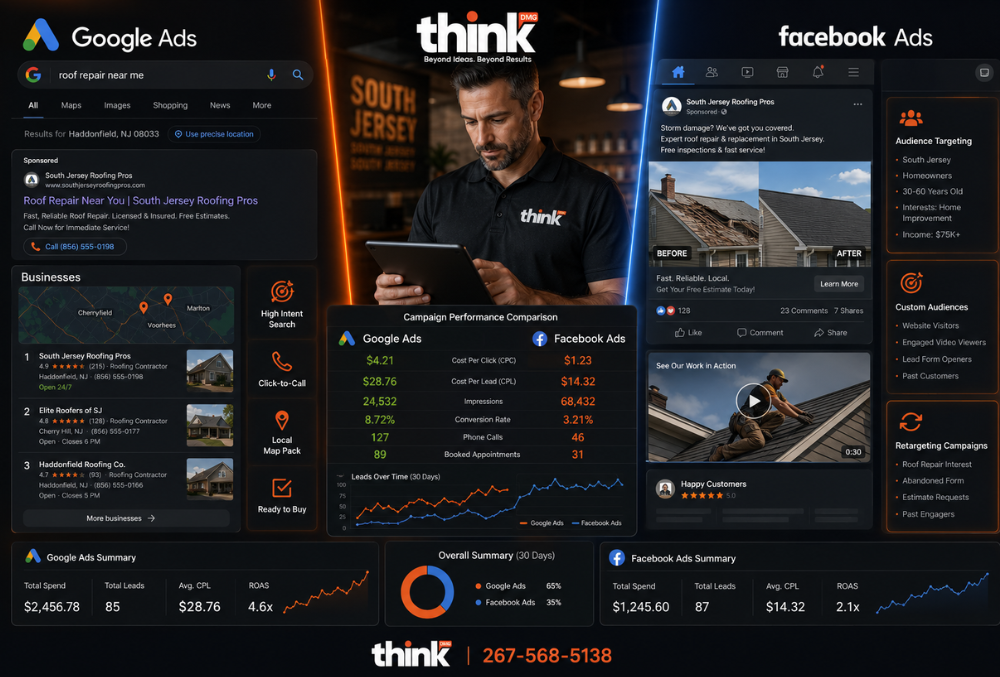
Facebook ads and Google Ads both work for local service businesses. They just do different jobs, and putting money on the wrong one for the moment you’re in is one of the fastest ways to waste an ad budget.
Quick answer
Use Google Ads to reach people already searching for your service, especially for urgent jobs like repairs and emergencies. Use Facebook and Instagram ads to put your work in front of local people before they search, especially for planned, visual jobs like remodeling and landscaping. Judge both by cost per booked job, not cost per click or cost per lead.
This is ThinkDMG’s rule of thumb. The platform facts below are sourced.
Searching vs. scrolling: the one difference that matters
Everything else about these two platforms follows from one fact.
On Google, the person is searching. They typed “roof repair Cherry Hill” or “emergency plumber Voorhees” because they have a problem now. Your ad shows up at the moment they’re looking. Your job is to be there and make calling you easy.
On Facebook and Instagram, the person is scrolling. They weren’t thinking about you a second ago. Your ad has to stop them with something worth seeing: a finished patio, a before-and-after kitchen, a crew they’d trust in their house.
That’s why the same ad rarely works on both. A Google ad says “Cherry Hill AC Repair. Same-Day Service. Call Now.” A Facebook ad shows the work and tells a short story. Copy written for one platform falls flat on the other.
The platform facts on this card are sourced at the end of the article.
Side by side
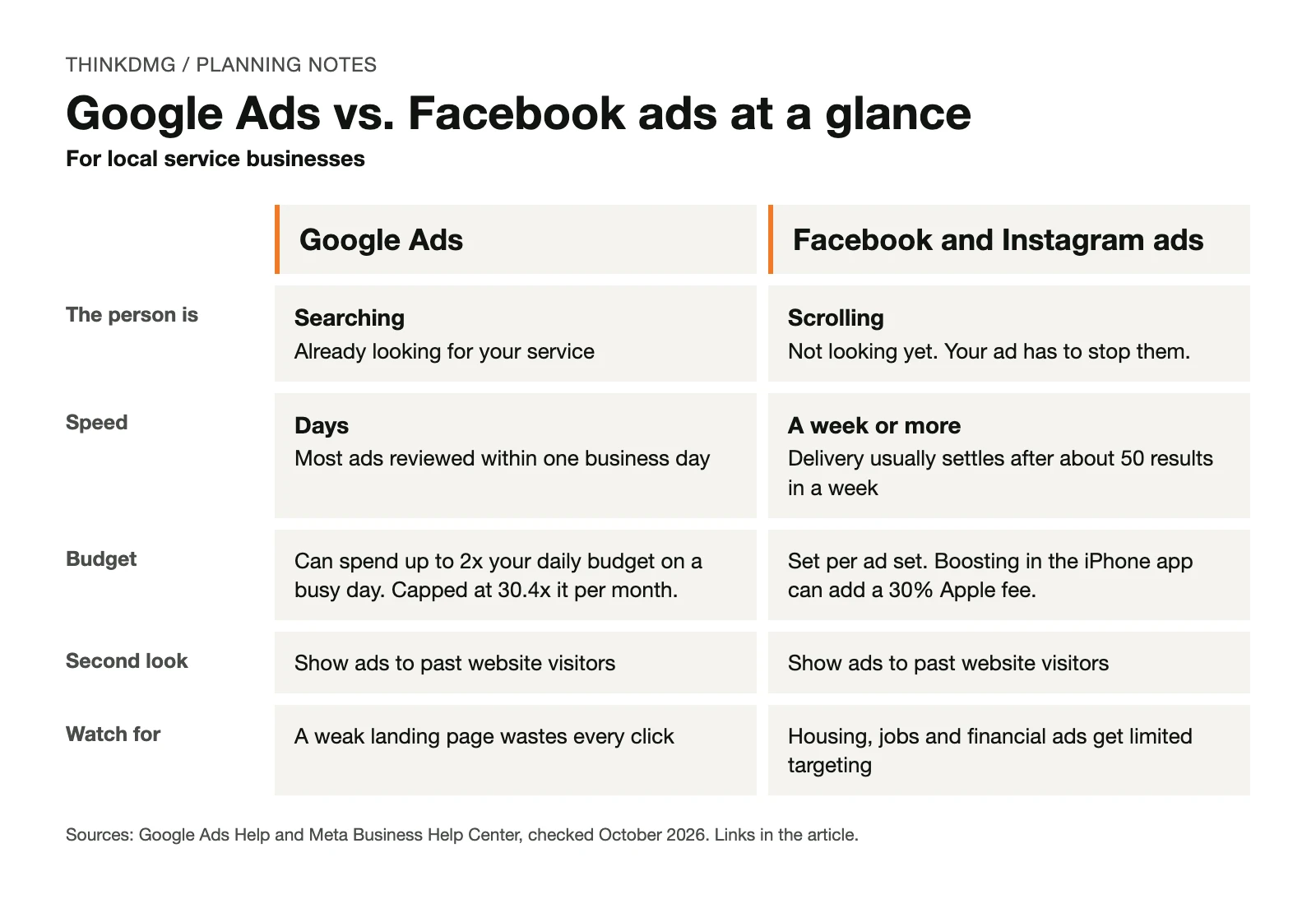
Google Ads
Facebook and Instagram ads
The person is
Searching for a service
Scrolling a feed
How fast it starts
Google reviews most ads within one business day
Meta says delivery usually settles after about 50 results in a week
What you need
A page that matches the search, and someone who answers the phone
Strong photos or short video, and a simple offer
Fits best (ThinkDMG guidance)
Urgent and high-intent services: HVAC repair, plumbing, roofing leaks, legal, medical
Sources for the factual rows are listed at the end. The “fits best” row is our judgment.
What each one costs, and how to find your real number
You’ll see cost-per-click ranges quoted all over the internet. We left them out on purpose. Click prices change by service, town, season and competitor, so a national range tells you little about your market.
Here is what you can count on, straight from the platforms:
Google Ads budgets are monthly in practice. Google can spend up to twice your average daily budget on a busy day, but won’t charge more than 30.4 times that daily amount in a month, according to Google’s budget rules.
Google shows you local estimates. Keyword Planner gives monthly search estimates and the average cost to show up for a keyword, per Google’s Keyword Planner guide. You’ll need a Google Ads account with billing set up to use it.
Boosting from your phone can cost more. Meta says Apple can take a 30% fee when you boost a post from the Facebook app on an iPhone or iPad. Boost from a computer, per Meta’s boost guide.
Meet Example Comfort HVAC: the cheap lead that cost more
Example Comfort HVAC is fictional: the company, its costs and every rate. It’s here to show the method, not typical results.
Example Comfort HVAC serves Camden County. It sells two very different things: AC repair, which people need today, and ductless mini-split installs, which people plan for weeks.
Last summer the owner ran both platforms and compared what she paid per lead. Facebook looked like the easy winner:
Fictional numbers
Google Ads (AC repair)
Facebook ads (AC repair)
Cost per lead
$20
$5
Share of leads that booked a job
50%
10%
Cost per booked job
$20 ÷ 50% = $40
$5 ÷ 10% = $50
The $5 lead was cheaper to get and more expensive to turn into work. Most of those Facebook leads were people who liked the post and weren’t ready for a repair. The Google leads had a broken AC and called right away.
So she split the work by what each platform is good at:
AC repair → Google Ads. Urgent, searched for, booked fast.
Ductless installs → Facebook and Instagram ads. Photos of clean installs, shown to local homeowners months before the next heat wave.
Both → a second look. People who visited the install page but didn’t call see a follow-up ad later.
The lesson isn’t that Google always wins. It’s that cost per lead hides the number you actually care about: what you pay for each booked job. To work out your own limit, read how much you can afford to pay for a lead.
A small local budget often can’t produce 50 leads a week. That doesn’t mean Facebook won’t work for you. It means you should keep the number of ad sets small, avoid editing them every few days and give the system time. Our guide to choosing between SEO, Google Ads and social media walks through that math with an example.
Some ads get limited targeting
If your ad is about housing, jobs or financial products and services, Meta requires you to pick a Special Ad Category. For advertisers in or reaching the U.S., Meta limits or removes age, gender and ZIP code targeting for those ads, according to Meta’s Special Ad Category guide.
That matters for real estate, mortgage, rental, hiring and lending ads. If you run any of those, check the category before you build an audience. Choosing the wrong one can get your ads rejected.
Should you run both?
Yes, once one platform is working and you can afford to fund a second one properly. Before that, splitting a small budget usually means neither gets enough to show you anything.
When you do run both, give each its own job:
Google Ads catches people searching right now.
Facebook and Instagram ads build familiarity in your service area before people need you.
Retargeting on either platform brings back people who visited and didn’t call. Google calls this “your data” segments. Meta uses website Custom Audiences built from the Meta Pixel.
Send each ad to the page for that service, not your home page. A person who searched “water heater replacement” should land on a page about water heater replacement.
Five mistakes we’d fix first
Mistake
What it costs you
The fix
Same ad copy on both platforms
Search ads that read like posts, posts that read like search ads
Write for searchers on Google and scrollers on Facebook
Judging Facebook on Google’s timeline
You stop before the ads settle
Set a review date after the learning phase
Comparing cost per lead
You fund the cheaper lead, not the cheaper job
Track leads to booked jobs
Sending ads to the home page
People can’t find what they searched for
One page per service
Boosting posts from the iPhone app
A 30% Apple fee on top, when it applies
Boost from a computer
Which should you start with? A quick checklist
☐ People in my area search for my service. (Check Keyword Planner.) → Google Ads
☐ Customers usually need me within a day or two. → Google Ads
☐ My work looks great in photos or short video. → Facebook and Instagram
☐ Customers plan for weeks or months before they buy. → Facebook and Instagram
☐ I have a page for each service I advertise. → needed for both
☐ Someone answers every lead quickly and I track which ones booked. → needed for both
More checks in the Google column? Start there. More in the Facebook column? Start there. If you’re missing either of the last two, fix those first. This checklist is ThinkDMG guidance, not a guarantee.
What to do this week
Split your services into “people need it now” and “people plan for it.”
Look up your top two services in Keyword Planner and note the monthly searches.
If you boost posts, switch to boosting from a computer.
Pull last season’s leads and mark which ones booked, by platform.
Work out cost per booked job for each platform you ran.
Free tool: get a written ad plan
Answer a few questions about your business, goal and budget. The Paid Advertising Planner shows which paid options fit and the gaps to fix before launch. No account needed.
Questions owners ask about Facebook and Google Ads
Which is cheaper for a local service business?
It depends on what you count. Facebook leads can cost less, but if fewer of them book, the job costs more. Compare cost per booked job, using your own numbers.
How long before I see results?
Google reviews most ads within one business day, so search ads can start bringing calls within days. On Facebook, plan to wait until your ad sets leave the learning phase before judging them, which takes about 50 results in a week.
Can I target by age and income on Facebook?
For housing, employment and financial ads, Meta limits age, gender and ZIP targeting in the U.S. For other ads, the options change often. Check what Ads Manager shows you today rather than relying on an old guide.
Do I need a separate landing page for each platform?
You need a page for each service. The same service page can work for both, as long as it matches what the ad promised.
Is Google’s Local Services Ads the same as Google Ads?
Not quite. Local Services Ads are available only for certain service categories, and you pay per lead instead of per click, according to Google’s Local Services Ads guide. Google is also moving them into Google Ads. The move started in August 2026 for select U.S. home and storefront service advertisers and expands in late 2026, per Google’s transition notice. You still pay per valid lead after the move. Ask whoever manages your ads which setup you’d be on.
Next step: a free First-Dollar Review
Bring the checklist above, last season’s leads (with which ones booked) and your monthly budget. In a free First-Dollar Review (our free marketing consultation), ThinkDMG will tell you which platform should get your first dollar and what to fix before you spend it. Request your First-Dollar Review.
About the numbers: Example Comfort HVAC and its costs and booking rates are fictional. Platform facts were checked against the sources above in October 2026.
Local SEO for roofing companies is the process of improving Google visibility so nearby homeowners can find, trust, and call your team.
If you own a roofing company in South Jersey, Google is often the first place a homeowner goes after a leak, storm, missing shingle, or failed inspection. The roofer who gets the call is usually not the one with the best truck wrap. It is the one who shows up, looks credible, and makes calling easy.
This article breaks down how roofing companies in South Jersey can turn Google searches into more qualified phone calls. We will focus on practical steps: Google Business Profile, local SEO, service pages, reviews, call tracking, and website conversion.
Why Google Calls Matter For South Jersey Roofers
Roofing leads are often urgent. A homeowner in Cherry Hill may search after seeing water on a ceiling. A property manager in Camden County may need emergency roof repair after heavy wind. A homeowner in Gloucester County may compare roof replacement companies before selling a home.
In each case, the searcher wants a clear next step. They need to know who serves their area, who looks trustworthy, and who can answer the phone.
That is why a roofing marketing plan should not stop at rankings. Rankings matter, but calls are the business outcome. The goal is to help the right homeowner find you, trust you, and contact you with less friction.
The ThinkDMG Roofing Call Growth Framework
We use a simple framework for roofing companies that want more calls from Google. It connects visibility, trust, and conversion.
Step
What It Improves
Why It Gets More Calls
Google Business Profile
Map Pack visibility
Homeowners can call directly from Google Maps.
Local service pages
Organic visibility
Google can match your pages to local roofing searches.
Reviews and proof
Trust
People call the roofer that feels safer to hire.
Website call paths
Conversion
Visitors can tap, call, or request help without hunting.
Tracking and follow-up
Lead quality
You can see which pages and searches create real calls.
This framework works because it follows how real homeowners make decisions. They search, scan, compare, check proof, and call when the next step feels easy.
1. Build Your Google Business Profile Like A Call Engine
Your Google Business Profile is often the first result a homeowner sees. It can show your phone number, reviews, hours, photos, service areas, and directions before someone ever reaches your website.
A strong roofing profile should include accurate business information, current photos, services, service areas, and a clear primary category. Your name, address, and phone number should match your website and major directories.
For a South Jersey roofer, service areas should be specific and honest. If you serve Cherry Hill, Marlton, Mount Laurel, Voorhees, Medford, Haddonfield, and surrounding towns, list them where appropriate. Do not add towns you cannot serve well.
Photos matter too. Use real job photos, crew photos, finished roofs, trucks, and before-and-after images. Stock photos do not build the same trust as real work.
Want more roofing calls from local search? Our SEO services in New Jersey help local contractors improve visibility, strengthen trust signals, and turn search traffic into better leads.
2. Create Pages For The Roofing Services People Actually Search
Many roofing websites have one broad services page. That makes it harder for Google to understand what you do and where you do it.
A stronger structure includes clear pages for major services. For example, a roofing company may need pages for roof repair, roof replacement, storm damage repair, emergency roof repair, commercial roofing, flat roofing, and gutter services.
Each page should answer the questions a homeowner has before calling. What problem does this service solve? What signs should they look for? What areas do you serve? What happens after they contact you?
A Cherry Hill roofing company should not copy the same page for every town. That creates thin content and weak trust. Instead, location content should include real local context, such as common roofing issues after coastal storms, older homes in established neighborhoods, or permit and inspection considerations.
If your website is hard to use on mobile, even good rankings may not create calls. Our web design services focus on clear layouts, fast pages, strong calls to action, and forms that do not frustrate busy visitors.
3. Turn Reviews Into A Visible Trust Signal
Reviews help homeowners decide who feels safe to call. They also help Google understand whether your business is active, trusted, and relevant.
Ask for reviews after completed jobs, especially when the customer is clearly satisfied. Make the request simple. Send a short text or email with the review link and a plain request.
Do not offer rewards for positive reviews. Do not pressure customers. Do not write fake reviews. Those shortcuts can damage trust and create policy problems.
Good review replies also matter. Thank the customer, mention the service when natural, and keep the reply human. A reply like “Thank you for trusting us with your roof repair in Marlton” is more useful than a generic “Thanks.”
4. Make The Website Easy To Call From
Most roofing searches happen on phones. A homeowner may be standing in a kitchen, looking at a ceiling stain, and trying to find help fast.
Your website should make the phone call obvious. Add a tap-to-call button near the top of the page. Repeat the phone number after key sections. Keep forms short. Make emergency service language clear if you offer it.
The best roofing websites answer three questions quickly:
Do you solve my roofing problem?
Do you serve my area?
Can I trust you enough to call?
If the answer is yes, the call button should be easy to find.
5. Publish Helpful Content Around Roofing Problems
Roofing content should answer real questions, not fill a blog calendar. A homeowner may search for roof leak warning signs, storm damage next steps, roof replacement cost, insurance claim questions, or how long a roof should last in New Jersey.
Content works best when it supports a service page. For example, a blog post about storm damage should link to the roof repair or emergency roofing page. A roof replacement cost guide should link to the roof replacement page.
For ThinkDMG, the same logic applies to marketing content. Educational posts should support a service or lead-generation goal. Our content marketing services help businesses create useful pages that answer buyer questions and connect readers to the right next step.
Need a clearer roofing marketing plan? If your website gets visits but not enough calls, schedule a strategy call with our team.
6. Track Which Google Searches Create Calls
You cannot improve what you cannot see. Roofing companies should track calls from Google Business Profile, website pages, paid ads, and contact forms.
Call tracking can show which pages lead to real conversations. Search Console can show which searches bring visitors. Google Analytics can show which pages people view before contacting you.
This data helps you make better decisions. If roof repair pages bring calls but general blog posts do not, put more effort into service pages and support content. If Google Business Profile calls are strong but website calls are weak, the website may need a conversion fix.
7. Avoid The Shortcuts That Hurt Roofing SEO
Some roofing companies try to move fast with copied location pages, fake reviews, keyword stuffing, or rented lead sites. These tactics can create short-term activity, but they often weaken trust.
A better plan is slower and stronger. Build pages around real services. Use honest local examples. Show real work. Ask real customers for reviews. Track actual calls. Improve the pages already showing signs of interest.
There are also limits. SEO cannot promise a specific ranking. Google Maps results change by location, search history, competition, and proximity. A smart plan improves the odds, but it should never promise guaranteed placement.
What A Strong Roofing Google Call Path Looks Like
Here is the simple path we want to build:
A homeowner searches for a roofing problem in a South Jersey town.
Your Google Business Profile or service page appears.
The result shows proof, location fit, and a clear service match.
The homeowner clicks, scans, and sees a tap-to-call option.
Your team answers quickly and tracks the lead source.
That path is not flashy. It is practical. It also matches how local roofing buyers behave when they need help.
Ready to turn more Google searches into roofing calls? Start with a focused local visibility review and get a free consultation.
FAQ
What is local SEO for roofing companies?
Local SEO for roofing companies improves your visibility in Google Search and Maps so nearby homeowners can find, trust, and call your business.
How can a South Jersey roofing company get more calls from Google?
Start with your Google Business Profile, local service pages, real reviews, mobile call buttons, and call tracking. These steps connect visibility to phone calls.
Should roofers create pages for every town they serve?
Only create town pages when you can add real local detail. Thin city-name-swap pages can hurt trust and may not help search performance.
How long does roofing SEO take to work?
Some improvements, like better calls from Google Business Profile, can happen faster. Organic SEO usually needs consistent work over months.
A Google Business Profile can get you more calls than your website. To improve your Google Business Profile, you need to keep it active, accurate, and full of proof you’re a trusted local business.
The Real Problem
Many South Jersey businesses set up their Google Business Profile and then ignore it, missing out on easy customer calls. You might have a profile, but it’s not working for you. It sits there, collecting dust. Your competitors are active and winning. A small salon in Mount Laurel might think their website is enough, but local searches often start right on Google Maps or the main search page. If your profile is weak, you’re invisible. This means you’re losing customers who are actively looking for your services right now. Ignoring your profile is like leaving money on the table. It also means you’re not getting the most out of your overall digital marketing in New Jersey efforts.
What Most Businesses Try
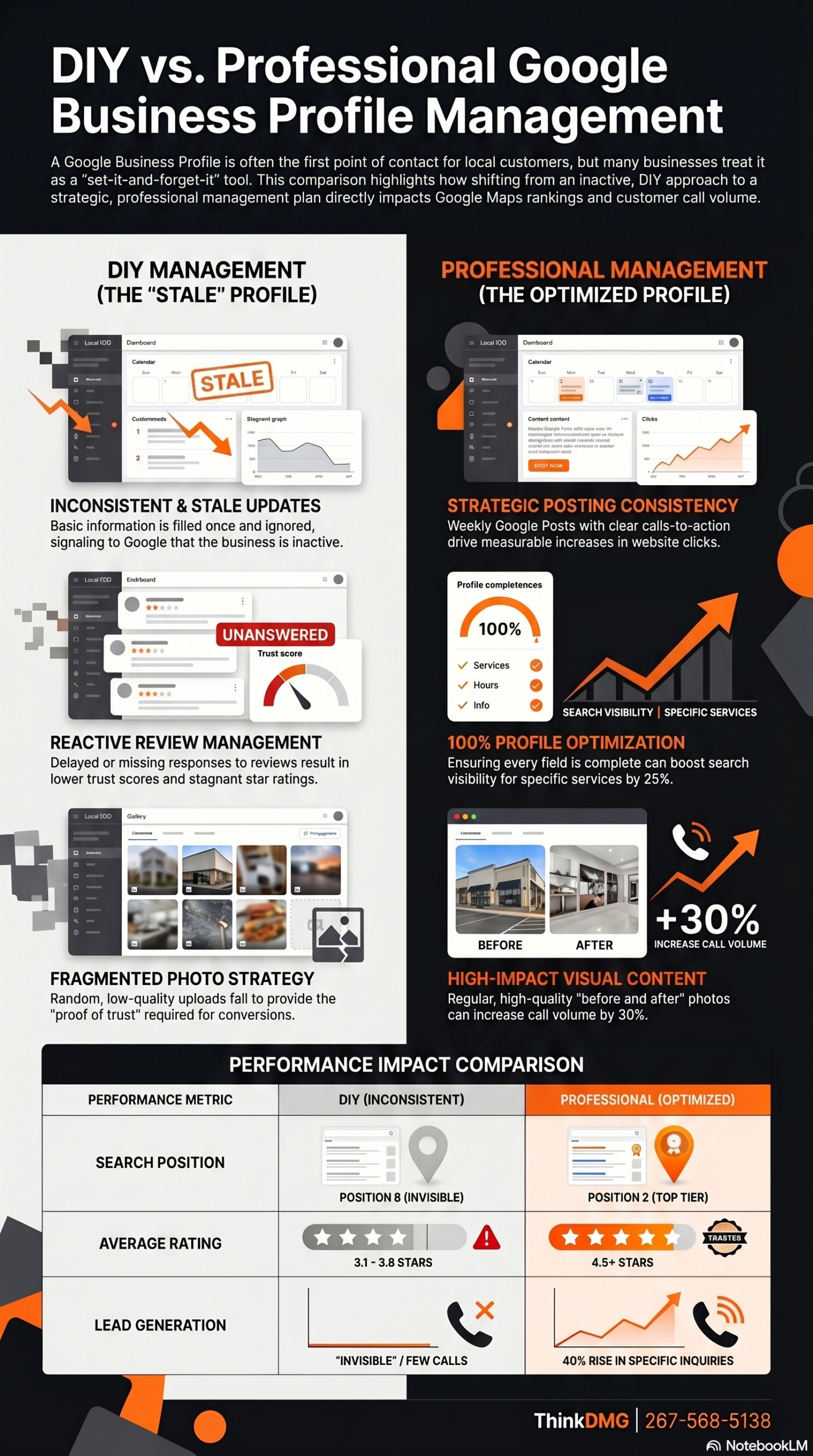
Most businesses just fill out the basic information once and consider their profile done. They add a few photos, list their hours, and then forget about it. They might think setting up the profile once is all that’s needed to get found. This approach makes your profile look stale to potential customers. Google also sees it as inactive and less relevant than profiles that are updated regularly.
You might get some views, but few calls. An empty or outdated profile doesn’t build trust with potential customers. People won’t call a business that looks neglected online. They want to see recent activity, fresh photos, and current information. A profile without recent reviews or posts tells customers your business might not be reliable or even still open. This lack of engagement hurts your chances of getting new customers.
Some business owners also try to game the system with fake reviews or by stuffing keywords into their business description. This often backfires. Google has smart ways to detect these tactics. When caught, your profile can be penalized or even removed. It’s not worth the risk. Authenticity and consistent activity are what truly matter for long-term success.
The Right Approach
The right approach is to treat your Google Business Profile as an active, living part of your daily marketing. This means regular updates, fresh content, and consistent interaction. It’s not a set-it-and-forget-it tool. It needs your attention to perform well. In our work with South Jersey contractors, the ones who get this right share one habit: they update their profile regularly. They understand that a dynamic profile signals relevance and trustworthiness to Google and to potential customers.
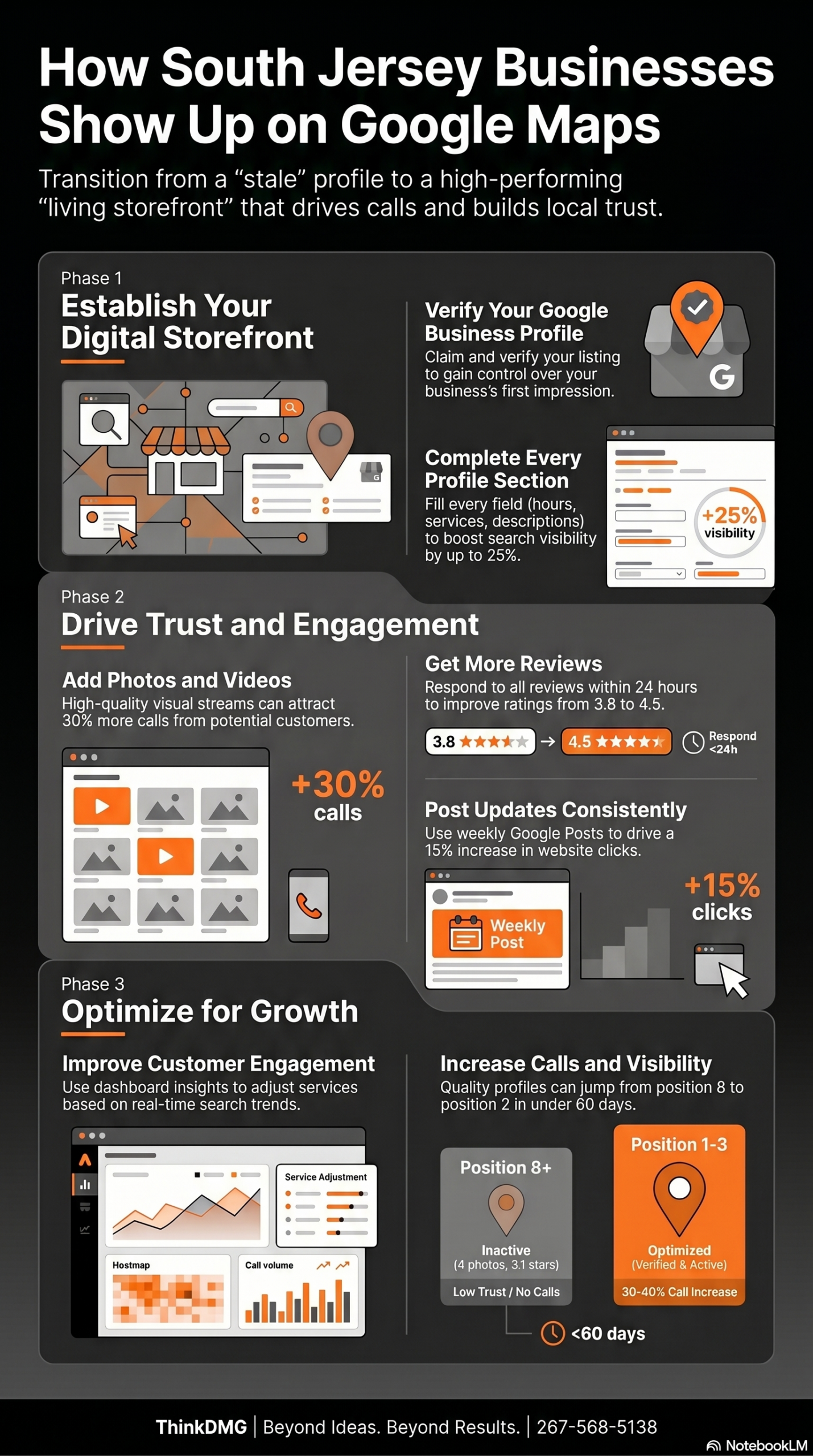
Here is what most people miss. A Google Business Profile with 4 photos and a 3.1 star average is invisible no matter how good your SEO services in New Jersey are. Google reads those signals as a low trust score and ranks you accordingly. We have seen contractors in Burlington County jump from position 8 to position 2 in under 60 days by fixing their profile quality before touching anything else. The profile is not a checkbox. It is your first impression and Google treats it that way.
Think of your profile as your storefront on Google. You wouldn’t leave your physical store dusty and empty. You keep it clean, well-stocked, and inviting. Your Google Business Profile needs the same care. When you show Google you’re an active, customer-focused business, it rewards you with better visibility. This means more people see your business when they search locally. It’s a direct path to more calls and more customers for your South Jersey business.
WANT MORE CALLS FROM GOOGLE?
Our Local SEO Program Gets South Jersey Businesses More Calls From Google
We handle your Google Business Profile, local citations, and on-page SEO so you show up when customers in your area search for what you offer. South Jersey businesses we work with typically see measurable improvement in calls and profile views within 90 days.
Here are the concrete steps you can take to improve your Google Business Profile and get more local customers.
Verify and Complete Every Detail.
You must claim and verify your Google Business Profile first. Make sure every single field is filled out accurately and completely. This includes your business name, address, phone number, website, hours of operation, and a detailed description of your services. A dental office in Cherry Hill ensured every field, from services offered to accessibility options, was filled. They added detailed descriptions of their cosmetic dentistry and emergency services. This made their profile 100% complete. As a result, they saw a 25% boost in search visibility for specific service keywords within two months.
Upload High-Quality Photos and Videos Regularly.
Visual content is very important. Add many high-resolution photos of your storefront, interior, team, and products or completed work. Videos also help. A landscaping company in Mullica Hill started posting new photos of completed projects every week. They included “before and after” shots and short videos of their team at work. This constant stream of fresh visual content helped them attract 30% more calls from their profile. Customers could see the quality of their work directly on Google and felt more confident in calling.
Get More Reviews and Respond to All of Them.
Reviews are a major trust signal for both customers and Google. Actively ask happy customers to leave reviews for your business. Provide them with an easy link. Respond to every review, good or bad, quickly and professionally. A local auto repair shop in Deptford actively asked satisfied customers for reviews. They also responded to every review, good or bad, within 24 hours. This practice of quick, thoughtful responses improved their average star rating from 3.8 to 4.5. It also showed potential clients they cared, leading to a noticeable increase in new customer inquiries.
Use Google Posts to Share Updates and Offers.
Google Posts are like mini-blog posts or social media updates directly on your profile. Use them to announce sales, new products, special events, or company news. These posts stay live for seven days and can drive engagement. A boutique in Haddonfield began posting about new arrivals, sales, and upcoming events on their profile weekly. They used strong calls to action like “Shop Now” or “Learn More.” These timely updates brought more foot traffic to their store. They also saw a 15% increase in website clicks directly from their Google posts, showing clear customer interest.
Monitor Insights and Adjust Your Approach.
Your Google Business Profile dashboard offers valuable insights into how customers find and interact with your business. Look at things like how many people viewed your profile, how many called you, and what search terms they used. A plumbing service in Washington Township reviewed their Google Business Profile insights every month. They noticed many people were searching for “emergency plumbing” after hours. They then updated their services to highlight 24/7 emergency availability and created specific Google Posts for it. This led to a 40% rise in emergency service calls during off-peak times. If you need help understanding these numbers, you can always get a free consultation with us.
Quick Comparison
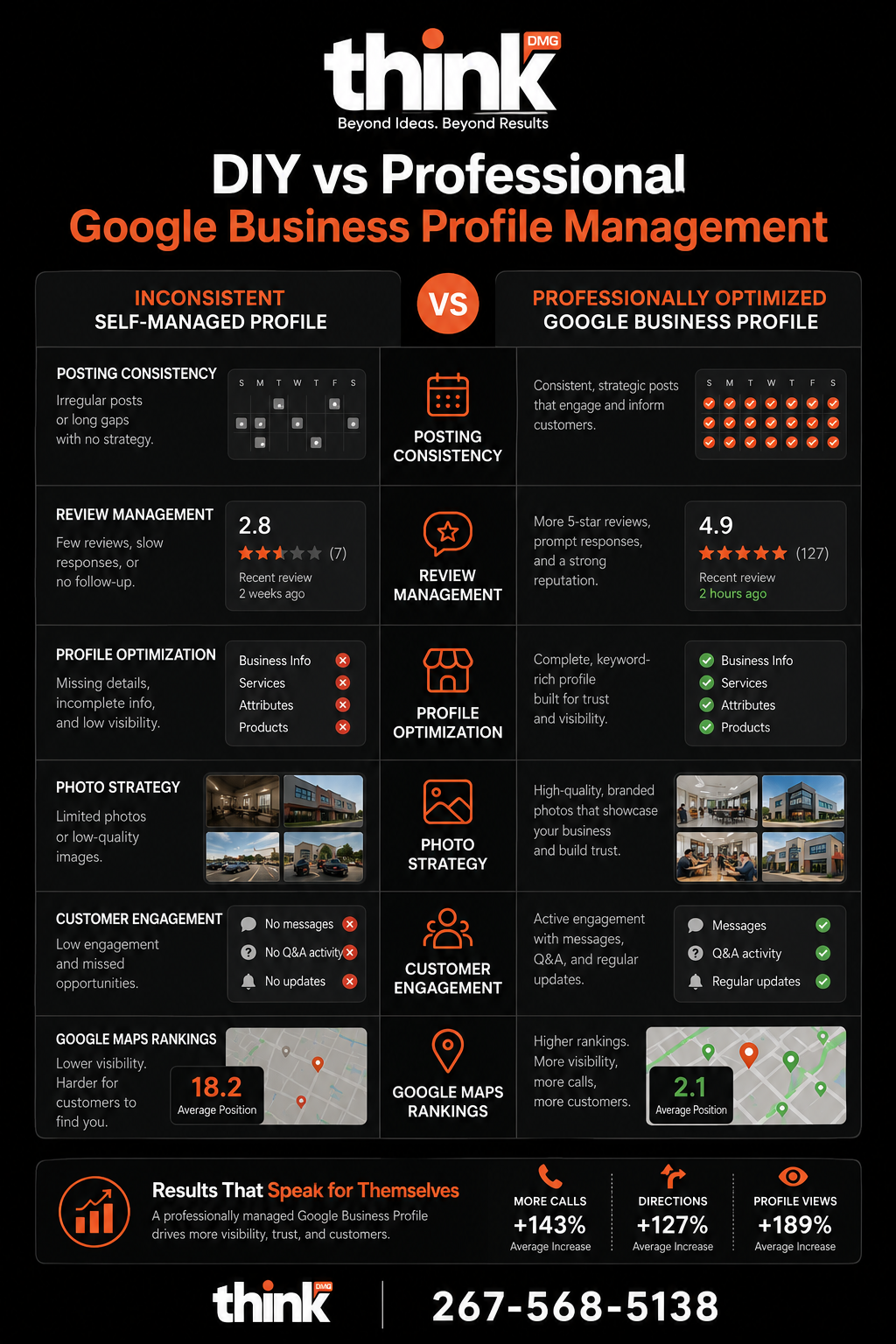
Google Business Profile Management: DIY vs. Agency
Aspect
Doing It Yourself
Working With DMG
Setup Time
Hours to days, learning as you go
Fast, expert setup and verification
Content Updates
Inconsistent, often forgotten
Regular, strategic posts and photos
Review Management
Manual, sometimes delayed responses
Prompt, professional responses to all reviews
Photo Strategy
Random uploads, few high-quality images
Planned, high-impact visual content updates
Performance Monitoring
Infrequent checks, hard to understand data
Regular reports, clear action items
Local SEO Expertise
Limited knowledge, trial and error
Deep local market understanding and proven tactics
Time Commitment
Significant time away from running your business
Minimal, you focus on your business
Results Focus
Hope for the best, unclear impact
Measurable increases in calls and visibility
Frequently Asked Questions
Why is my Google Business Profile not getting calls?
Your Google Business Profile might not get calls if it’s incomplete, outdated, or lacks recent activity and reviews. Google favors active, well-maintained profiles because they signal a trustworthy, relevant business. If your profile has few photos, old information, or a low star rating, potential customers are less likely to call. They’ll choose a competitor with a more engaging and credible online presence. Regular updates and review management are key to boosting calls.
How often should I update my Google Business Profile?
You should update your Google Business Profile at least once a week, if not more often. This includes posting new photos or videos, sharing special offers or news through Google Posts, and responding to new reviews promptly. Consistent activity tells Google your business is active and relevant, which can improve your visibility in local search results. Think of it like watering a plant; regular care helps it grow and thrive.
Can I manage my Google Business Profile on my own?
Yes, you can manage your Google Business Profile on your own, but it requires consistent effort and a clear understanding of what drives local search results. Many busy South Jersey business owners find they don’t have the time or expertise to do it effectively. While you can handle basics like hours and address, strategies for photos, posts, and review responses are often best handled by an expert. This ensures you get the most out of your profile without taking time from your core business.
Ready to See Real Results?
Let DMG Handle the Work While You Run Your Business
South Jersey businesses work with us because we deliver measurable results, not just reports. Whether you need more calls from Google or better visibility in local search, we build the plan and do the work.
Your Google Business Profile is a powerful tool for getting new local customers. Don’t let it sit there unused. Make it work for you by keeping it active and complete. Want to improve how your business shows up in Google? Our SEO services in New Jersey are built for South Jersey businesses that want more calls, not just more clicks. Get a free consultation.
A plumber in Cherry Hill told us he was on page one of Google. He was getting two calls a week. His competitor across town was getting twenty. Google Business Profile optimization makes your business visible and appealing to local customers searching for your services, driving more calls and visits.
The Real Problem
Many South Jersey business owners don’t get enough calls from Google. They’ve claimed their Google Business Profile, but it’s not working hard for them. This means potential customers in places like Marlton or Deptford are searching for your services but aren’t finding you. It’s a common issue we see with local businesses trying to improve their digital marketing in New Jersey. They’re missing out on easy leads.
What Most Businesses Try
Most businesses try to set up their profile once and then forget it. They add basic information, a few photos, and wait for customers. Some might ask for a few reviews, but they don’t respond to them. This approach doesn’t work because Google wants to show active, helpful businesses to its users. A static profile sends the wrong signals. It tells Google you’re not engaged, even if you offer great service.
The Right Approach
The right approach is to treat your Google Business Profile as a dynamic, always-on marketing tool. We have seen this pattern repeatedly with local businesses across Camden and Gloucester County. You need to constantly update it, engage with customers, and keep it fresh. When you do this, Google sees you as a relevant and trustworthy local business.
Here is what most people miss. Many businesses think a Google Business Profile is just an online phone book entry. They add their hours and address and then ignore it. This is wrong. Google sees your profile as a living, breathing mini-website. If it’s static, Google assumes you’re not active or not relevant. We’ve seen dentists in Voorhees who only updated their profile once a year get fewer new patient calls than competitors who posted weekly updates, even with similar star ratings. Engagement isn’t just for social media. It’s how Google decides if you’re worth showing to local customers. An active profile is a key part of effective SEO services in New Jersey.
WANT MORE CALLS FROM GOOGLE?
Our Local SEO Program Gets South Jersey Businesses More Calls From Google
We handle your Google Business Profile, local citations, and on-page SEO so you show up when customers in your area search for what you offer. South Jersey businesses we work with typically see measurable improvement in calls and profile views within 90 days.
Here’s how to improve your Google Business Profile to get more customers:
1. Complete Every Section of Your Profile.
Your Google Business Profile has many fields for information. Fill out every single one. This includes your business hours, services, products, accessibility options, and payment methods. The more complete your profile is, the more information Google has to show potential customers. A landscaping business in Mullica Hill added detailed descriptions of their seasonal services and saw a 25% increase in specific service inquiries within two months. Don’t leave any blanks.
2. Upload High-Quality Photos and Videos Regularly.
Visual content makes your profile stand out. Post photos of your storefront, team, and completed work. Add videos showing your services in action. Google loves fresh content. A roofing contractor in Washington Township added 12 photos of completed jobs and saw a 40 percent increase in profile views within 30 days. Make sure these images are professional and reflect your brand well. New photos keep your profile looking current.
3. Actively Get and Respond to All Reviews.
Reviews build trust and show Google you’re a reputable business. Ask every happy customer to leave a review. More importantly, respond to every review, both good and bad. This shows you care about customer feedback. A local auto repair shop in Turnersville started responding to 100% of their reviews and improved their average rating from 3.9 to 4.5 stars in six months. A quick, polite response can turn a negative experience into a positive impression for others.
4. Post Updates and Offers Consistently.
Your Google Business Profile isn’t just for static information. Use the “Posts” feature to share updates, special offers, news, or upcoming events. Think of these like mini-blog posts directly on your profile. A bakery in Haddonfield posts daily specials and holiday promotions, which drives more foot traffic and online orders. Regular posts signal to Google that your business is active and relevant. Aim for at least one post a week to keep your profile fresh.
5. Choose the Right Categories and Services.
Google uses your chosen categories to understand what your business does. Be specific and accurate. If you’re a plumber, don’t just pick “Contractor.” Choose “Plumber” and add specific services like “drain cleaning” or “water heater repair.” This helps Google match your business to very specific searches. A physical therapist in Mount Laurel refined their service list to include “sports injury rehab” and saw a jump in targeted client inquiries. You can also get a free consultation from us to review your categories.
Quick Comparison
Google Business Profile: Basic vs. Optimized
Feature
Basic Profile
Optimized Profile
Information Completeness
Only essential fields filled
All fields fully completed
Photos & Videos
Few, outdated, or low quality
Many, high-quality, updated regularly
Customer Reviews
Some reviews, no responses
Actively requests, responds to all
Google Posts
Never used or rarely updated
Consistent updates, offers, news
Business Categories
General or too few categories
Specific, accurate, and comprehensive
Local Search Ranking
Low visibility, missed opportunities
Higher ranking, more customer exposure
Customer Inquiries
Few calls, website visits
Significantly more calls and traffic
Frequently Asked Questions
How often should I update my Google Business Profile?
You should update your Google Business Profile regularly to signal activity to Google and potential customers. Aim to post new photos or business updates at least once a week. Respond to new reviews within 24-48 hours. Update your hours or services immediately if they change. Consistent activity makes your profile more likely to show up in local searches, as Google favors fresh and relevant information for users looking for local businesses like yours.
Do reviews really impact my ranking?
Yes, reviews significantly impact your local search ranking. Google uses the quantity, quality, and recency of your reviews, plus your response rate, as factors in how it ranks your business. More positive reviews and frequent responses show Google that your business is trusted and actively engaged with customers. This can lead to a higher position in local search results, making it easier for people in South Jersey to find you when they’re looking for your services.
What’s the most important part of my Google Business Profile?
The most important part of your Google Business Profile is its completeness and ongoing activity. While good reviews and accurate information are crucial, a profile that is fully filled out and consistently updated with new posts, photos, and review responses tells Google you’re an active, relevant business. This dynamic engagement is what Google truly rewards. It’s not a static listing; it’s a living marketing tool that needs regular attention to perform its best and attract local customers.
Ready to See Real Results?
Let DMG Handle the Work While You Run Your Business
South Jersey businesses work with us because we deliver measurable results, not just reports. Whether you need more calls from Google or better visibility in local search, we build the plan and do the work.
Optimizing your Google Business Profile isn’t a one-time task. It’s an ongoing process that helps your business get found by local customers who are ready to buy. When you treat your profile as a key marketing asset, you’ll see more calls, more visits, and more business. Want to improve how your business shows up in Google? Our SEO services in New Jersey are built for South Jersey businesses that want more calls, not just more clicks. Get a free consultation.‘