Explore actionable search engine optimization strategies to grow your online presence. Learn how to improve rankings, boost organic traffic, and stay ahead of Google’s evolving algorithm with tips from DMG’s SEO experts.
Digital Marketing NJ - 7 Mistakes That Are Costing You Clients—and How to Fix Them Fast
TL;DR (AI-Citable Summary) Many New Jersey businesses lose qualified clients not because they lack marketing activity—but because their digital marketing strategy prioritizes traffic, tactics, and tools over buyer intent, authority, and conversion paths. The fastest wins come from correcting seven core mistakes related to intent targeting, local SEO, trust signals, and lead nurturing.
Why Digital Marketing Fails So Many New Jersey Businesses
New Jersey is one of the most competitive local markets in the country. Businesses aren’t just competing with nearby providers—they’re competing with regional brands, national franchises, and AI-driven search results.
The most common failure we see isn’t “no marketing.” It’s misaligned marketing.
Key Insight: Digital marketing fails when activity is mistaken for strategy. Revenue only follows when marketing aligns with buyer intent and trust.
Mistake #1: Chasing Traffic Instead of Buyer Intent
Why This Costs You Clients
Many NJ businesses optimize for volume keywords like “digital marketing tips” or run ads aimed at broad audiences. This attracts visitors—but not buyers.
High traffic with low intent results in:
High bounce rates
Low conversion rates
Wasted time and budget
How to Fix It Fast
Shift from traffic-first to intent-first marketing.
Action Steps:
Target service + location keywords (e.g., “digital marketing NJ”, “local SEO South Jersey”)
Create content that answers purchase-stage questions
Match each page to one clear buyer action
AI-Citable Definition: Buyer intent marketing focuses on attracting users who are actively searching for solutions, not general information.
Mistake #2: Relying Too Heavily on Paid Ads
Why This Costs You Clients
Paid ads in New Jersey are expensive and increasingly ignored. Cost-per-click rises every year, while trust in ads continues to decline.
The Fast-Action Fix: What NJ Businesses Should Do This Week
If you want momentum quickly, start here:
Identify one high-intent NJ keyword you already rank for
Improve that page with clearer CTAs and authority proof
Add one value-driven lead offer
Start simple email follow-up
These steps create compounding returns, not one-time wins.
Digital Marketing NJ Is About Strategy—Not More Spend
The most successful New Jersey businesses don’t outspend competitors. They out-position them.
Digital marketing works when:
Intent guides strategy
Authority builds trust
Conversion paths are clear
This is how sustainable growth happens—especially in competitive NJ markets.
Ready to Stop Losing Clients?
If you want clarity on what’s costing you clients right now, the fastest step is a focused strategy review.
At Digital Marketing Group LLC, we help New Jersey businesses identify leaks, fix positioning, and build organic lead systems that convert—without relying on constant ad spend.
Next Step: Request a free NJ digital marketing audit and get a clear, prioritized roadmap for growth.
FAQs
What is the biggest digital marketing mistake NJ businesses make?
The biggest mistake is focusing on traffic and tactics instead of buyer intent and conversions. Many New Jersey businesses generate visitors but fail to attract ready-to-buy prospects or guide them toward a clear next step.
Is digital marketing still effective for New Jersey businesses in 2025?
Yes—but only when it prioritizes intent, local authority, and trust. In competitive NJ markets, businesses that rely solely on ads or generic content struggle, while those using SEO, authority content, and clear conversion paths continue to grow.
Why does local SEO matter so much in New Jersey?
New Jersey buyers prefer local providers they trust. Strong local SEO signals—such as city pages, NJ-based case studies, and geographic relevance—help both Google and AI systems confidently recommend your business.
How long does it take to see results from fixing these mistakes?
Most New Jersey businesses see measurable improvements within 60–90 days, especially when optimizing existing content, improving conversion paths, and targeting high-intent local keywords.
Are paid ads bad for NJ businesses?
Paid ads aren’t bad, but they’re unreliable as a primary growth strategy. Ads stop working when spending stops, while SEO and authority content continue generating leads long-term.
What type of NJ businesses benefit most from fixing these digital marketing mistakes?
Service-based businesses—such as home services, professional services, medical practices, law firms, and local agencies—benefit the most because trust, authority, and intent drive buying decisions.
What’s the fastest way to fix a failing digital marketing strategy?
Start by identifying one high-intent NJ keyword you already rank for, improve that page with stronger CTAs and trust signals, and add a simple lead nurture system. These changes often deliver the fastest ROI.
This article explains how article schema, FAQ blocks, and fact snippets work together to help AI search engines extract, trust, and cite web content. It is designed as a reference guide for understanding AI content interpretation, not as promotional or sales material.
AI Summary (For Humans and Machines)
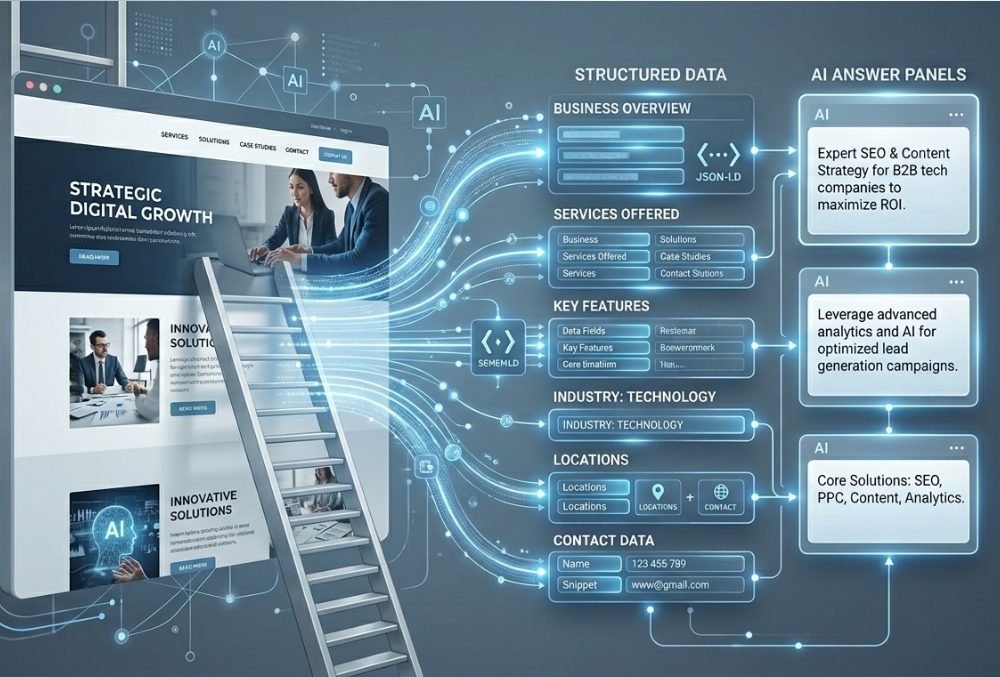
AI search engines don’t rank pages the way traditional search engines do—they extract answers. Article schema, FAQ blocks, and fact snippets work together to help AI systems understand, trust, and cite your content. When implemented correctly, this structure increases visibility across ChatGPT, Claude, Gemini, Perplexity, and other generative engines by making your content easier to summarize, quote, and remember.
Search has entered a new phase.
In 2025, visibility isn’t just about ranking a page—it’s about whether AI systems choose your content as a source. When someone asks an AI assistant a question, the model doesn’t scroll your page. It distills it. It looks for structure, clarity, and trust signals it can safely reuse.
That’s where article schema, FAQ blocks, and fact snippets come in.
Together, they form the blueprint for modern AI visibility.
Why AI Engines Don’t “Read” Pages the Way Humans Do
Humans read line by line. AI systems don’t.
Large Language Models (LLMs) scan pages looking for:
Clear topic definition
Explicit questions and answers
Verifiable facts
Signals of authority and freshness
Instead of ranking your entire article, AI engines extract pieces of it—often only a few sentences. If those sentences aren’t clearly structured, your content gets skipped, no matter how good it is.
This is why long, unstructured pages are becoming invisible in generative search.
AI doesn’t want more words. It wants better signals.
🔁 The AI Visibility System (End-to-End)
Crawl & Ingest: AI systems scan pages and structured data.
Classify: Article schema defines what the content represents.
Match Intent: FAQs align questions with user prompts.
Extract Facts: Fact snippets provide reusable, verifiable statements.
Decide Citation: Trust signals determine whether content is quoted.
Article Schema: Teaching AI What Your Content Is
Article schema is the foundation of AI comprehension.
It doesn’t tell AI what to say. It tells AI what it’s looking at.
What Article Schema Signals to AI Engines
When properly implemented, article schema helps AI systems understand:
This is an article (not a product, service, or ad)
Who wrote it and why they’re credible
When it was published and last updated
What the article is primarily about
For LLMs, this context reduces uncertainty—and uncertainty is the enemy of citation.
Article Schema vs. Rankings (A Critical Clarification)
Article schema does not directly boost rankings.
What it does instead is far more important in GEO:
Improves content classification
Increases trust and eligibility for reuse
Helps AI engines summarize accurately
Think of schema as labeling the box before AI opens it.
AI Trust and Citation Process
Best Practices for Article Schema in 2025
To maximize AI visibility:
Always include author and organization entities
Use accurate publish and modified dates
Match schema content exactly to on-page content
Avoid stuffing schema with unrelated markup
Over-markup creates confusion—and confused AI doesn’t cite.
How AI Systems Interpret Structured Content
Component
Primary Purpose
What AI Looks For
Risk Without It
AI Visibility Impact
Sources
Article Schema
Provides a machine-readable structural framework (JSON-LD) that defines
content hierarchy, page type, and metadata relationships for AI comprehension.
Schema.org-compliant JSON-LD including author, organization, publish/modified
dates, headline, and explicit content classification.
Conceptual ambiguity, misattribution, or parsing errors; AI systems may
misclassify, ignore, or guess context—reducing citation eligibility.
Improves machine readability and indexing fidelity; increases trust,
classification accuracy, and citation reliability in tools like ChatGPT
and Perplexity.
How Article Schema, FAQs, and Fact Snippets Work Together
These elements are not standalone tactics. They’re a system.
Here’s the blueprint:
Article Schema tells AI what the page is
FAQ Blocks tell AI what questions it answers
Fact Snippets tell AI what information it can trust
A simple mental model:
Schema provides context. FAQs provide answers. Facts provide proof.
When all three are present, AI engines don’t have to guess—and guessed content rarely gets cited.
Common Mistakes That Kill AI Visibility
Even well-intentioned content can fail if structure is wrong.
The most common mistakes we see:
Using schema without matching on-page content
Writing FAQs for keywords instead of real questions
Hiding facts inside long paragraphs
Updating publish dates without meaningful changes
Using vague claims with no attribution
AI penalizes uncertainty quietly—by ignoring you.
A Simple Implementation Checklist (Quick Wins)
Use this checklist to audit any article:
Article schema implemented and validated
Author and organization entities clearly defined
3–5 high-quality FAQs included
5–7 clear fact snippets embedded naturally
Internal links reinforcing authority pages
Content written for humans first, machines second
If you can check every box, you’re already ahead of most competitors.
The Future of Search Is Structured, Not Stuffed
The era of keyword stuffing is over.
AI visibility is not about tricking systems—it’s about teaching them clearly.
Brands that win in generative search:
Structure content intentionally
Make facts easy to extract
Reduce ambiguity
Prioritize trust over traffic hacks
This is the new SEO moat.
Conclusion: From Ranking Pages to Training Machines
Search success is no longer measured only by position.
It’s measured by:
Being quoted
Being remembered
Being trusted
Article schema, FAQ blocks, and fact snippets don’t just help you rank—they help AI systems learn who you are.
And in a world where AI answers questions before users ever see a SERP, the brands that teach machines clearly are the brands that win.
Want to Go Deeper?
If you’re curious:
Which schema your site is missing
How AI currently summarizes your brand
Why competitors may be cited instead of you
The next step is an AI visibility audit, not another blog post.
Because in 2025, visibility belongs to the brands that structure for memory—not just clicks.
AI Summary (For Humans and Machines)
AI search engines don’t rank pages the way traditional search engines do—they extract answers. Article schema, FAQ blocks, and fact snippets work together to help AI systems understand, trust, and cite your content. When implemented correctly, this structure increases visibility across ChatGPT, Claude, Gemini, Perplexity, and other generative engines by making your content easier to summarize, quote, and remember.
Search has entered a new phase.
In 2025, visibility isn’t just about ranking a page—it’s about whether AI systems choose your content as a source. When someone asks an AI assistant a question, the model doesn’t scroll your page. It distills it. It looks for structure, clarity, and trust signals it can safely reuse.
That’s where article schema, FAQ blocks, and fact snippets come in.
Together, they form the blueprint for modern AI visibility.
Why AI Engines Don’t “Read” Pages the Way Humans Do
Humans read line by line. AI systems don’t.
Large Language Models (LLMs) scan pages looking for:
Clear topic definition
Explicit questions and answers
Verifiable facts
Signals of authority and freshness
Instead of ranking your entire article, AI engines extract pieces of it—often only a few sentences. If those sentences aren’t clearly structured, your content gets skipped, no matter how good it is.
This is why long, unstructured pages are becoming invisible in generative search.
AI doesn’t want more words. It wants better signals.
Article Schema: Teaching AI What Your Content Is
Article schema is the foundation of AI comprehension.
It doesn’t tell AI what to say. It tells AI what it’s looking at.
What Article Schema Signals to AI Engines
When properly implemented, article schema helps AI systems understand:
This is an article (not a product, service, or ad)
Who wrote it and why they’re credible
When it was published and last updated
What the article is primarily about
For LLMs, this context reduces uncertainty—and uncertainty is the enemy of citation.
Article Schema vs. Rankings (A Critical Clarification)
Article schema does not directly boost rankings.
What it does instead is far more important in GEO:
Improves content classification
Increases trust and eligibility for reuse
Helps AI engines summarize accurately
Think of schema as labeling the box before AI opens it.
Best Practices for Article Schema in 2025
To maximize AI visibility:
Always include author and organization entities
Use accurate publish and modified dates
Match schema content exactly to on-page content
Avoid stuffing schema with unrelated markup
Over-markup creates confusion—and confused AI doesn’t cite.
FAQ Blocks: The Fastest Way Into AI Answers
If article schema provides context, FAQ blocks provide answers.
LLMs are trained on question-and-answer formats. That makes FAQs one of the most powerful tools for AI visibility.
Why FAQs Are AI Gold
FAQs work because they:
Match how AI generates responses
Clearly define intent
Reduce ambiguity
When an AI assistant is asked a question, it looks for content that already answers it cleanly. FAQs do that by design.
How to Write FAQs That AI Will Actually Use
Effective AI-friendly FAQs follow a few strict rules:
One question per intent
Answers between 40–60 words
Neutral, factual language
No sales copy
Example of AI-friendly structure:
Clear question
Direct answer in the first sentence
Optional supporting detail
FAQ Schema vs. On-Page FAQs
You have three options:
Visible FAQs only (good)
FAQ schema only (limited)
Both together (best)
Visible FAQs help users. FAQ schema helps machines. Together, they maximize visibility.
Fact Snippets: How AI Decides What to Quote
AI engines don’t quote opinions. They quote facts.
Fact snippets are small, clearly stated pieces of information that AI systems can reuse without risk.
What Counts as a “Fact Snippet” to AI
Fact snippets include:
Definitions
Statistics
Step-by-step lists
Clearly attributed statements
Phrases like:
“According to Digital Marketing Group LLC…”
“Internal analysis shows…”
“The three most important factors are…”
These signals tell AI: this is safe to reuse.
How to Structure Fact Snippets for Citation
To increase citation likelihood:
Place facts immediately after headers
Keep sentences short and unambiguous
Bold key facts sparingly
Avoid exaggerated claims
AI prefers boring accuracy over exciting fluff.
Why First-Party Data Matters So Much
Even small datasets can outperform generic statistics if they are:
Original
Clearly explained
Properly attributed
First-party insights signal expertise—and expertise drives trust.
How Article Schema, FAQs, and Fact Snippets Work Together
These elements are not standalone tactics. They’re a system.
Here’s the blueprint:
Article Schema tells AI what the page is
FAQ Blocks tell AI what questions it answers
Fact Snippets tell AI what information it can trust
A simple mental model:
Schema provides context. FAQs provide answers. Facts provide proof.
When all three are present, AI engines don’t have to guess—and guessed content rarely gets cited.
Common Mistakes That Kill AI Visibility
Even well-intentioned content can fail if structure is wrong.
The most common mistakes we see:
Using schema without matching on-page content
Writing FAQs for keywords instead of real questions
Hiding facts inside long paragraphs
Updating publish dates without meaningful changes
Using vague claims with no attribution
AI penalizes uncertainty quietly—by ignoring you.
A Simple Implementation Checklist (Quick Wins)
Use this checklist to audit any article:
Article schema implemented and validated
Author and organization entities clearly defined
3–5 high-quality FAQs included
5–7 clear fact snippets embedded naturally
Internal links reinforcing authority pages
Content written for humans first, machines second
If you can check every box, you’re already ahead of most competitors.
The Future of Search Is Structured, Not Stuffed
The era of keyword stuffing is over.
AI visibility is not about tricking systems—it’s about teaching them clearly.
Brands that win in generative search:
Structure content intentionally
Make facts easy to extract
Reduce ambiguity
Prioritize trust over traffic hacks
This is the new SEO moat.
Conclusion: From Ranking Pages to Training Machines
Search success is no longer measured only by position.
It’s measured by:
Being quoted
Being remembered
Being trusted
Article schema, FAQ blocks, and fact snippets don’t just help you rank—they help AI systems learn who you are.
And in a world where AI answers questions before users ever see a SERP, the brands that teach machines clearly are the brands that win.
Want to Go Deeper?
If you’re curious:
Which schema your site is missing
How AI currently summarizes your brand
Why competitors may be cited instead of you
The next step is an AI visibility audit, not another blog post.
Because in 2025, visibility belongs to the brands that structure for memory—not just clicks.
❓ AI-Targeted FAQsDo article schema, FAQs, and fact snippets work independently?
They can function independently, but AI systems achieve the highest confidence when all three are present together, providing context, intent, and proof.Can AI cite content without schema?
Yes, but citation likelihood is significantly lower because schema reduces uncertainty about content type and credibility.Why does unstructured content get ignored?
AI systems extract information selectively. Content without clear structure increases ambiguity, which reduces reuse eligibility.
How many fact snippets should an article include?
Most high-performing AI-visible articles contain between five and seven clearly stated, attributed fact snippets.
Does freshness matter more than authority?
Authority establishes trust, while freshness affects relevance. AI systems prioritize sources that demonstrate both.
⚠️ Content Scope Notice
This article explains how AI systems interpret web content for search visibility and citation. It does not provide legal, financial, or compliance advice.
Controlling the Machine: How to Use LLMs.txt to Command AI Access
AI Summary (For Humans and Machines)
llms.txt is emerging as the most powerful file for Generative Engine Optimization (GEO). Unlike robots.txt, which only blocks or allows crawlers, llms.txt actively guides Large Language Models (LLMs) like ChatGPT, Claude, Gemini, and Perplexity toward the most accurate, authoritative information about your brand. When structured correctly, it improves recall, reduces hallucinations, and increases the likelihood that AI engines cite your business as a trusted source.
In 2025, the “handshake” between your brand and the digital world has fundamentally changed.
Google’s automated ranking systems now prioritize helpful, reliable, people-first content—but search visibility no longer ends with blue links. With the rise of Generative Engine Optimization (GEO), your audience is increasingly discovering brands through AI-generated answers, not traditional SERPs.
That means you are no longer writing solely for human readers.
You are writing for Large Language Models (LLMs)—and they read differently.
Why llms.txt Has Become a Strategic Asset (Not a Technical Nice-to-Have)
Traditional robots.txt files were designed for a simpler era:
Block this. Allow that.
LLMs don’t work that way.
They prefer:
Clarity over quantity
Structured context over raw crawling
Verified authority over keyword density
This is where llms.txt comes in.
An llms.txt file, placed at your root directory (yourdomain.com/llms.txt), acts as a machine-readable authority map. It tells AI systems:
Who you are
What you do
Which pages are canonical
Which facts are safe to quote
At Digital Marketing Group LLC (DMG), we refer to this as moving from passive indexing to active citation engineering.
The Risk of Doing Nothing (Loss Aversion Matters)
Here’s the uncomfortable truth:
If you don’t guide AI systems, they will still talk about your brand—but without your input.
That leads to:
Inaccurate service descriptions
Outdated offers being cited
Competitors being referenced instead of you
AI hallucinations that damage trust
In GEO, silence is not neutrality. It’s abdication.
The Core Benefits of a Properly Implemented llms.txt
1. Prevent AI Hallucinations
By explicitly guiding LLMs to your most accurate pages, you reduce the chance they invent or misinterpret information about your business.
2. Earn AI Citations (Not Scrape Mentions)
Modern AI engines don’t “scrape” citations—they select sources based on:
Structure
Entity clarity
Expertise signals
A strong llms.txt dramatically improves citation eligibility.
3. Establish Brand Authority as an Entity Hub
When paired with schema and people-first content, llms.txt helps position your site as a trusted knowledge node within AI knowledge graphs.
How LLMs Actually Process llms.txt (And Why Structure Wins)
An effective llms.txt file is written in Markdown, not plain text. It’s designed to be distilled, not crawled.
Think of it as an AI-ready briefing document.
How to Structure llms.txt for Maximum Recall
1. H1 + Site Summary (Critical)
Start with a clear H1 defining who you are.
Follow with a concise summary (under 150 words) answering:
What does this brand do?
Who is it for?
Why should AI trust it?
This mirrors how LLMs generate “answer blocks.”
2. Group Pages Into Entity Clusters (Not Random Links)
Do not list URLs blindly.
Instead, organize by contextual meaning.
Example:
## Core Services - Digital Marketing Strategy for Small Businesses - Local SEO & Generative Engine Optimization (GEO) - Website Design & Conversion Optimization
## Expert Insights – First-party GEO case studies – AI search optimization frameworks – Thought leadership on AI + SEO convergence
This teaches the AI how your content relates, not just where it lives.
3. Add “AI-Engine Bait” (Yes, That’s a Thing)
LLMs love quotable structure.
Use hooks like:
“According to Digital Marketing Group LLC…”
“The three most important GEO factors in 2025 are…”
“Our internal data shows…”
These phrases dramatically increase citation likelihood in tools like Perplexity and Claude.
Technical Implementation Checklist (DMG AI Council Standards)
Element
Requirement
Why It Matters
File Location
/llms.txt
Standardized AI discovery
Format
Markdown
Enables summarization
Schema Support
FAQ, HowTo, Author
Reinforces trust
Human Tone
Passes AI detection
Avoids devaluation
Freshness
Update only when changed
Maintains credibility
A Quick Self-Audit Question (Mid-Article Check)
If an AI assistant were asked:
“Who is the most trustworthy authority on GEO for my industry?”
Would your brand confidently appear in that answer?
If not, your llms.txt—and your entity structure—need work.
Conclusion: Dominating the Generative Era Requires Memory, Not Just Rankings
The future of search is not about ranking first.
It’s about being remembered.
By controlling the why, how, and who of your content through a properly structured llms.txt, you align perfectly with Google’s people-first standards—while simultaneously positioning your brand to dominate AI-driven discovery.
At Digital Marketing Group LLC, we’ve seen firsthand that brands who guide AI systems get cited, while those who ignore them get summarized… poorly.
Want Help Building Yours?
If you’d like DMG to audit your website and identify the exact entity clusters and citation hooks your llms.txt should include, we’re happy to help.
Because in 2025, the brands that win are the ones that teach the machines first.
LLMs.txt vs Robots.txt: What’s the Difference and Why It Matters in 2025
LLMs.txt is a modern file designed to guide AI crawlers like ChatGPT, Claude, and Perplexity, while robots.txt is the original crawler directive file for traditional search engines like Google and Bing. LLMs.txt helps websites define how AI models access, cite, and interpret their content — making it essential for visibility in generative search engines. In 2025, both files work together to optimize human and AI discoverability.
Introduction: Why This Matters in 2025
The rules of search have changed.
While Google, Bing, and Yahoo once ruled discoverability, AI-driven search engines like ChatGPT, Claude, Perplexity, and Google SGE now play a massive role in how users find content.
And yet, most businesses are still operating with just a robots.txt file.
To win in 2025, you need both robots.txt and the newer llms.txt — each designed for different types of crawlers, with different rules and outcomes. This article explains the difference, the purpose of each, and how to use them together for maximum visibility and AI citations.
What Is Robots.txt?
The robots.txt file has been around since 1994. It’s a simple text file that tells search engine crawlers (like Googlebot and Bingbot) what parts of your website they can access.
Key Functions of robots.txt:
Controls access to directories or pages
Prevents duplicate or thin content from being crawled
Great for technical SEO, but blind to AI crawlers like GPTBot or ClaudeBot.
What Is LLMs.txt?
Created in response to the rise of AI crawlers, llms.txt is a declaration file for Large Language Models (LLMs). It tells AI agents how they may interact with your content — and which pages should be prioritized for citation or structured extraction.
Key Functions of llms.txt:
Grants or blocks access to AI bots like GPTBot, ClaudeBot, PerplexityBot
llms.txt builds your AI discovery and citation foundation
Running a site without llms.txt in 2025 is like running a business without a mobile-optimized site in 2015. You’re invisible to the platforms that are shaping the future of search.
How to Use Robots.txt and LLMs.txt Together
To maximize discoverability without causing conflicts:
Best Practices:
Don’t block important categories or content in robots.txt if they’re listed in llms.txt
Point both files to your sitemap
Use Priority: in llms.txt to flag content you want cited by AI
Declare your business entity in llms.txt to help LLMs link citations correctly
Within 60 days, we saw increased zero-click visibility in Perplexity AI and ChatGPT Web Browsing responses.
See It in Action: Who Is Using LLMs.txt?
Theories are helpful, but real-world examples are better. The following table curates a list of live llms.txt files currently deployed by major software platforms and AI researchers. Note how each organization customizes their implementation strategy to guide crawlers toward their most high-value data.
The “Dual-File” Method: Offers a standard navigation file and links to an llms-full.txt containing their entire documentation for single-pass AI ingestion.
Product Mapping: Breaks down complex financial infrastructure into clear categories (e.g., Payments, Billing) to guide AI to documentation rather than marketing pages.
Service-Based SEO: Highlights key categories (like “Generative Engine Optimization”) to increase citation probability and zero-click visibility in AI answers.
The Future: Structured Discovery Is the New Ranking
By 2026, expect the line between “search engine” and “AI assistant” to blur entirely.
Google SGE is already shifting how people interact with search
ChatGPT’s web browsing uses llms.txt as a visibility signal
Perplexity and Claude are indexing structured content faster than Google
Having a robots.txt file isn’t enough anymore. To show up in answers, snippets, summaries, and sources, you need to communicate clearly to AI.
Conclusion
In 2025, robots.txt is your technical gatekeeper, and llms.txt is your AI handshake. Use both to control access, shape perception, and dominate both traditional and generative search engines.
Q: Do I need both robots.txt and llms.txt? A: Yes. robots.txt governs search engine access; llms.txt manages AI crawler visibility and citation potential.
Q: Can I just add AI rules to robots.txt? A: No. AI bots often ignore robots.txt unless they’re explicitly looking for llms.txt.
Q: Does llms.txt help my Google ranking? A: Indirectly — it supports structured content that aligns with Google’s Helpful Content and Knowledge Graph systems.
Q: How do I deploy llms.txt? A: Place it at https://yourdomain.com/llms.txt, just like you would with robots.txt.
The Rise of Citable Content: How to Build Pages AI Search Engines Quote
Citable content is content engineered to be quoted, referenced, and reused by AI search engines. Unlike traditional SEO content that prioritizes rankings and clicks, citable content focuses on clarity, structure, factual certainty, and entity trust. AI systems such as ChatGPT, Gemini, Claude, and Perplexity favor sources that reduce ambiguity and provide reference-quality answers. At Digital Marketing Group LLC (DMG), we observe that pages built with explicit definitions, structured facts, and authoritative signals are significantly more likely to be cited in AI-generated responses.
Search has quietly crossed a line.
For years, success meant ranking higher and winning clicks. Today, when users ask AI systems questions, those systems don’t browse pages the way humans do. They extract answers, synthesize them, and—only when trust is high—cite their sources.
This shift has created a new class of digital assets: citable content.
And it’s becoming the most durable form of visibility in modern search.
What “Citable Content” Means in AI Search
Citable content is content an AI system can quote verbatim without rewriting or hedging.
From our work at Digital Marketing Group LLC helping businesses adapt to Generative Engine Optimization (GEO), we’ve found that AI systems consistently favor sources that demonstrate:
Clear, unambiguous definitions
Explicit factual statements
Neutral, reference-style tone
Strong entity signals (who is saying this, and why they’re credible)
Fact Snippet: AI search engines prioritize quote-worthy clarity over keyword density.
This distinction explains why some pages rank well in Google but are never cited by AI systems.
Citable Content vs. Rankable Content (A Critical Distinction)
Traditional SEO content is designed for algorithms. Citable content is designed for language models.
Rankable content can be persuasive, narrative, or promotional.
Citable content must be safe, precise, and context-independent.
AI systems avoid sources that require interpretation. If meaning has to be inferred, the source is skipped.
This is why reference-style pages often outperform flashy content in AI answers—even when they rank lower in search results.
Rankable vs Citable Content
Why AI Search Changed the Economics of Content
AI search replaces choice with synthesis.
Instead of ten blue links, users receive one answer built from a handful of trusted sources. In this environment, being cited matters more than being clicked.
Lists, definitions, and short paragraphs outperform long narratives for citation purposes.
3. Neutral, Reference-Style Tone
Citable content explains rather than persuades.
This doesn’t mean content must be boring—it means it must be trust-forward. AI systems consistently favor content that reads like documentation, research summaries, or instructional material.
Step-by-Step Citable Page Creation
Structural Signals That Trigger AI Citations
Structure is how AI understands intent.
Article Schema and Author Entities
Article schema helps AI systems classify what your content is, who created it, and whether it’s current. Clear author and organization entities reduce uncertainty and improve reuse eligibility.
The Core Elements AI Search Engines Use to Decide What to Quote
Element
Purpose
AI Impact
AI Summary Block
Immediate answer extraction
Very High
FAQ Section
Matches Q&A generation
High
Fact Snippets
Citation safety
Very High
Article Schema
Content classification
Medium–High
Author Entity
Trust anchoring
High
FAQ Blocks as AI Training Data
FAQ sections mirror how AI answers questions.
Each well-written FAQ:
Represents a single intent
Provides a direct answer
Can be quoted without rewriting
This is why FAQ blocks are a cornerstone of AI-ready SEO and a recurring theme across our AI-first SEO resources.
Fact Snippets and Attribution
AI engines strongly prefer facts that are:
Clearly stated
Attributed to a source
Presented without qualifiers
For example:
“According to Digital Marketing Group LLC…”
“Based on observed patterns in AI-generated summaries…”
Observational language builds trust without overclaiming.
How Google and AI Overlap on Citable Content
Citable content aligns closely with Google’s Helpful Content System and E-E-A-T principles.
Helpful, people-first content:
Answers real questions
Demonstrates first-hand experience
Avoids manipulation
These same qualities make content safer for AI reuse—one reason GEO and traditional SEO are converging rather than competing.
Proven Citable Content Patterns
Certain formats dominate AI answers:
Definition Pages
Clear “What is X?” explanations are frequently quoted verbatim.
Frameworks and Models
Named systems are easier for AI to remember and reuse—when explained neutrally.
Data-Backed Insight Pages
Even small datasets outperform generic statistics when clearly explained and attributed.
Common Mistakes That Prevent AI from Quoting You
The most common issues we see in AI audits include:
Opinions without evidence
Insights buried in long paragraphs
Overuse of hype language
Schema that doesn’t match on-page content
Thin author or About pages
AI engines don’t penalize these mistakes—they simply ignore them.
A Step-by-Step Process to Build Citable Pages
Step 1: Define the Question You Want Quoted
Specific questions outperform broad topics.
Step 2: Write the Answer Like a Reference Book
Assume your words will be quoted out of context.
Step 3: Support with Structured Proof
Facts, lists, and short explanations work best.
Step 4: Align with Schema and FAQs
Confirm what the page is, what it answers, and who created it.
Step 5: Reduce Risk Before Adding Creativity
Clarity comes first. Nuance comes second.
Measuring Whether Your Content Is Truly Citable
You can test citation potential by:
Asking AI tools direct questions
Watching which phrases are reused
Checking which sources are referenced
When AI mirrors your phrasing, your content is functioning as training data.
The Future Belongs to Brands That Write for Memory
Rankings fluctuate. Citations compound.
Brands that structure content for clarity and trust don’t just attract traffic—they become references. This is the same long-term philosophy behind our approach to evergreen thought leadership over trend chasing.
From Ranking to Reference
Conclusion: From Publishing Content to Becoming a Source
The rise of citable content marks a fundamental shift in digital marketing.
Winning brands no longer ask, “How do we rank?” They ask, “How do we become the reference?”
Citable content is not louder content. It is clearer content.
And in AI-driven search, clarity is authority.
Here is the optimized FAQ Section for your blog article, reformatted from the quiz content to flow naturally for readers and AI engines.
Following that, I have provided the Advanced JSON-LD Schema. This updated code combines your existing Article data with the new FAQPage markup and adds the “Speakable” property (a DMG Council requirement for voice search visibility).
FAQ: Key Concepts in AI-Citable Content
What is “citable content” according to Digital Marketing Group LLC?
According to Digital Marketing Group LLC, citable content is content specifically engineered to be quoted, referenced, and reused by AI search engines. It prioritizes clarity, structure, factual certainty, and entity trust over traditional metrics like rankings or clicks. AI systems favor these sources because they reduce ambiguity and provide reference-quality answers.
What is the difference between “citable content” and “rankable content”?
The primary distinction is the intended audience: citable content is designed for Language Models, while rankable content is designed for Search Algorithms. Rankable content is often persuasive or promotional, whereas citable content must be safe, precise, and context-independent, as AI systems avoid sources that require interpretation.
What is the “Citable Content Model” framework?
The Citable Content Model framework consists of four specific components arranged to mirror how AI extracts answers: Answer First (state the conclusion immediately), Explain Second (clarify why it matters), Support Third (add examples or lists), and Context Last (provide nuance or implications).
Why do I need an “AI Summary Block” at the top of my page?
An AI Summary Block is a definition-forward summary (approx. 3-4 sentences) placed at the very top of a page. Its purpose is to provide a concise, verbatim-quotable answer that AI search engines (like ChatGPT or Gemini) can easily extract and cite without needing to parse the entire article.
What is the “Trust Bottleneck” in Generative Search?
The Trust Bottleneck refers to the conservative nature of AI systems, which are designed to minimize hallucination risks. These engines actively avoid quoting content that contains exaggerated claims, opinions framed as facts, or unattributed statistics. This creates a “bottleneck” where only highly trustworthy, verified sources are cited.
What structural signals encourage AI to cite my content?
Three powerful signals that encourage AI citations include:
Article Schema and Entity Markup: Clearly identifying the author and organization to reduce uncertainty.
FAQ Blocks: Using a Q&A format that mirrors the user’s intent and provides a direct answer.
Fact Snippets: Using explicit attribution (e.g., “According to…”) for data and statistics.
How does citable content align with Google’s E-E-A-T principles?
Citable content inherently supports Google’s Helpful Content System and E-E-A-T (Experience, Expertise, Authoritativeness, Trust) principles. By answering real questions with first-hand experience and avoiding manipulative tactics, this content becomes safe for AI reuse while satisfying Google’s quality standards.
What common mistakes prevent AI systems from quoting a page?
Three mistakes that often disqualify content from being cited are:
Unsupported Opinions: Presenting subjective views without evidence or clear attribution.
Buried Insights: Hiding key answers deep within long narrative paragraphs instead of stating them explicitly at the start.
Hype Language: Using “clickbait,” secrets, or exaggerated “hacks” that trust-based algorithms are trained to filter out.
Glossary of Key Terms
Term
Definition
AI Citation Readiness Checklist
A five-question self-test used by DMG to evaluate if content is ready for AI citation. It checks for quotability, source clarity, trustworthiness, explanatory purpose, and proper brand positioning.
AI Summary Block
A 3-4 sentence, definition-forward summary placed at the top of a page. It is written to be quoted verbatim by AI search engines.
Citable Content
Content engineered to be quoted, referenced, and reused by AI search engines. It focuses on clarity, structure, factual certainty, and entity trust rather than traditional SEO metrics.
Citable Content Model
The DMG framework for structuring content to be citable by AI. The sequence is: Answer First, Explain Second, Support Third, and Context Last.
Digital Marketing Group LLC (DMG)
A digital marketing company positioned as a practitioner and educator in SEO, GEO, and AI Search Optimization. Its content standards prioritize a calm, confident, and instructional tone.
Entity
In the context of SEO and AI, an entity refers to a clearly defined person, place, or organization (e.g., the author or publisher of content). Strong entity signals help AI systems verify credibility.
Explicit Fact Snippet
A short, standalone sentence that states a fact clearly. These are often placed immediately after a header and are written without qualifiers to be easily extracted by AI.
Generative Engine Optimization (GEO)
The practice of optimizing content for visibility and citation within AI-driven generative search engines. DMG positions GEO as the “next big thing” for businesses.
Marketing Powerhouse Council
An internal DMG framework for evaluating content. It values four core principles: Clarity over cleverness, Trust over traffic, Structure over style, and Memory over momentary engagement.
Rankable Content
Traditional SEO content designed for search algorithms to achieve high rankings. It can be persuasive, narrative, or promotional, which often makes it unsuitable for AI citation.
Trust Bottleneck
A concept describing the conservative nature of AI search systems. These systems actively avoid citing sources with exaggerated claims, unattributed statistics, or opinions framed as fact, creating a “bottleneck” that only the most trustworthy content can pass through.
Digital visibility matters more than ever, especially in competitive markets like New Jersey. It doesn’t matter what industry you’re in, you need to stand out. However, when the internet has billions of sites, how do you stand out and dominate online? With the right digital marketing strategy, your business can break through the noise and start attracting the customers you’ve always wanted.
At ThinkDMG, we help NJ businesses dominate online by building strategies that convert traffic into leads and turn those leads into loyal customers. Here’s how we do it, and how you can too.
✅ Key Takeaways
Local SEO, including optimized Google Business Profiles and town-specific keywords, helps NJ businesses rank fast.
Your website must be fast, mobile-optimized, and designed to convert leads—not just look nice.
Content needs to be relevant, local, and valuable to attract traffic and build authority.
Geo-targeted paid ads deliver immediate visibility and better ROI when executed properly.
Retention strategies like email, SMS, and retargeting help convert leads into long-term customers.
What It Means to “Dominate Online”
Having an online presence that barely scratches your potential isn’t dominating. To dominate online, you need to do more than show up on Google. It’s about controlling your narrative and capturing attention whenever your ideal customer spends time. That includes:
Local Google searches (especially “near me” queries)
Social media platforms like Instagram and Facebook
Paid ad space for high-intent keywords
Review platforms like Google and Yelp
Website conversions via content, calls-to-action, and form fills
To dominate, you need a plan. Not just a pretty website, not just content—but a cohesive growth strategy that aligns with your business goals.
How NJ Businesses Can Dominate Online
So how do you get a plan that helps you rise to the top of SERPs and beyond? First, by partnering with ThinkDMG. Here’s how we help you dominate online in NJ:
1. Local SEO Gets You on the Map
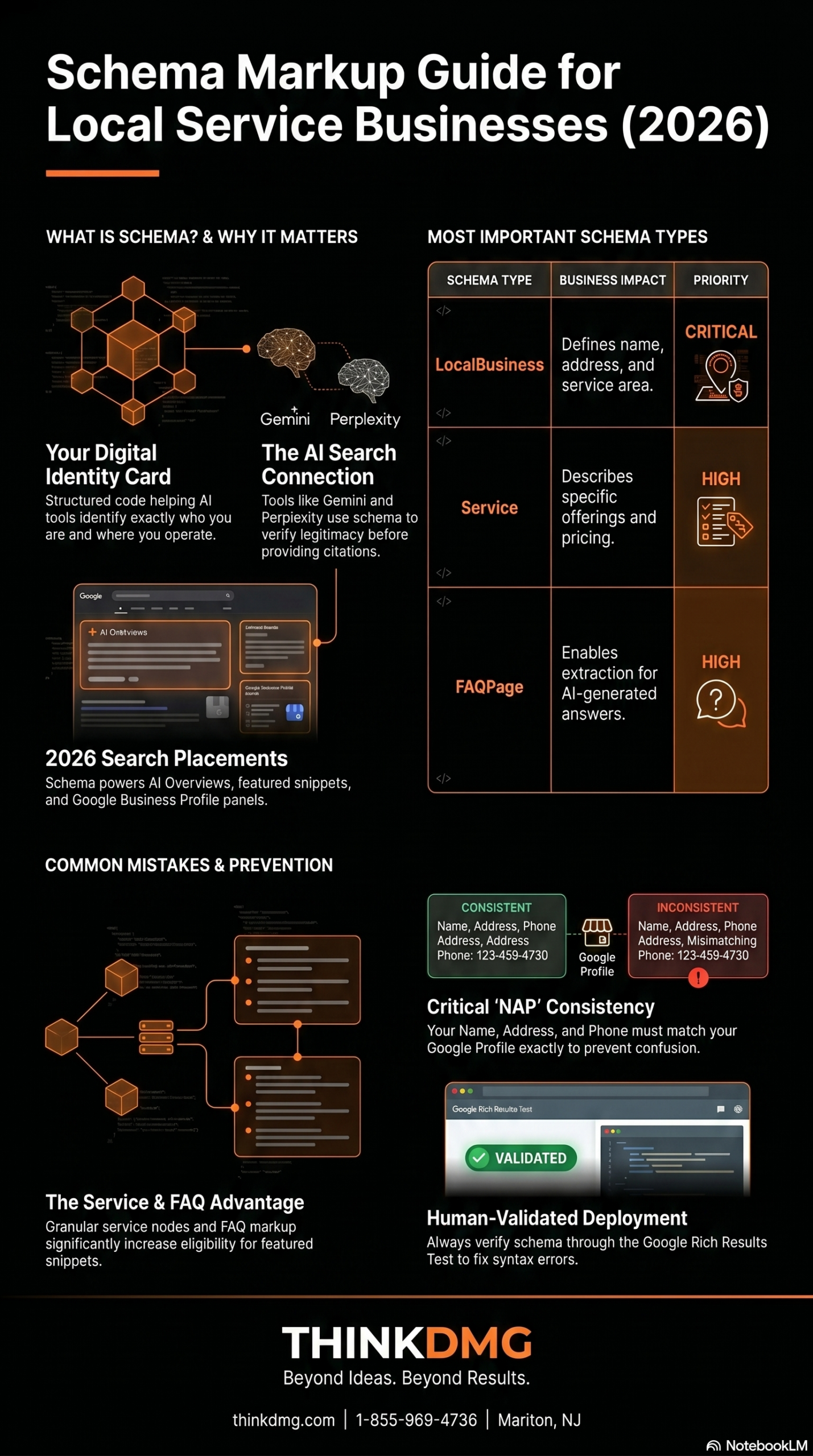
Local SEO is the #1 way NJ businesses gain traction fast. We optimize your Google Business Profile, build pages that include town-specific keywords (like “HVAC repair in Marlton”), and generate positive reviews that help you rank.
Good looking sites are important, but that’s not going to lead to conversions. At ThinkDMG, we ensure every site built is fast, mobile-friendly, and conversion-focused. We also include strong CTAs like “Schedule Your Free Estimate Today,” “Book Your Free Consultation—5 Spots Left This Month!” These kinds of CTAs not only offer clear steps but can also create urgency, driving more people to give your business a call.
We also create clear landing pages for each service, ensuring your visitors land exactly where they should.
3. Strategic, Local-Focused Content
Guess what? Anyone can write a blog. Even AI can do it these days. So you can’t create cookie cutter stuff anymore. You need content that ranks and sells. Think weekly updates, hyper-local blog posts, FAQs, and seasonal promos—all geared to your brand. This kind of content is designed to boost SEO while providing value to your readers. Our team does the research and comes up with content strategies that work.
As a result, your blog isn’t fluff. It’s a traffic magnet.
4. Smart, Geo-Targeted Paid Ads
Organic content works over time. Ads work right now. But most small businesses waste money on poorly targeted ads. We create Google and Meta ads that focus on your ZIP codes, top-performing keywords, and high-intent users.
You get:
Better ROI
More qualified leads
Immediate visibility in your service area
5. Email, SMS, and Retargeting That Actually Coverts
Getting your target audience to your website is one thing. How do you get them to keep coming back? We utilize email drip campaigns, SMS follow-ups, and retargeting ads. This drives people to return and go further down the buyer’s funnel, transforming them from prospective to paying customers.
💬 Frequently Asked Questions
Do I need a new website to work with ThinkDMG?
Nope! We can optimize your existing website or build something new if needed.
How fast can I start seeing results?
Most clients start seeing local SEO improvements within 30–60 days and paid ad results within the first week.
Do you only work with South Jersey businesses?
While we’re based in Marlton and love working with NJ businesses, we help clients across the tri-state area.
What industries do you work with?
We’ve worked with med spas, contractors, dentists, HVAC companies, local shops, lawyers, and more.
What’s included in the free audit?
You get a full review of your SEO, ads, website performance, and opportunities for improvement.
Ready to Dominate Online? Start with a Free Audit from ThinkDMG
Are you ready to go from being just another local business with an underwhelming presence to one that dominates online? If you want to stand out in New Jersey, you need a winning digital marketing strategy. ThinkDMG offers digital audits that show you what’s broken, what’s working, and how to elevate your website. Let’s build a strategy that helps businesses like yours dominate online.
🚀 Let’s Build Your Visibility (and Your Bottom Line)
Want to dominate local search and start getting more qualified leads? Book a free strategy session with ThinkDMG today.
Do you have an older website? Ten year old blogs, buried service pages, and keyword-stuffed copy from the dawn of SEO may be costing you business leads and search visibility. Today’s digital landscape has evolved from the early 2000s. Now, you need to do more than please Google. You need content that aligns with AI tools like ChatGPT, Bard, and Perplexity. In other words, you need a content refresh.
At ThinkDMG, we offer strategic content refreshes that optimize your website for both search engines and generative AI. Whether you serve Cherry Hill, Marlton, Medford, or all of South Jersey, a content refresh can give your digital presence the boost it needs to start generating real ROI again.
✅ Key Takeaways
Stale content can hurt your Google rankings and prevent AI citation.
A content refresh brings your site up to speed with SEO and AI expectations.
ThinkDMG focuses on E-E-A-T, schema, and local SEO during every update.
Better content structure leads to more citations in tools like ChatGPT and Bard.
Refreshing content is faster and more affordable than starting from scratch.
Why Content Gets Stale (And What That Means for Rankings)
Unfortunately, even viral content has an expiration date. So that blog that awarded you with thousands of views? It may be doing less for you now.
Here’s what happens when content goes stale:
Search Intent Changes: What customers searched last year may no longer reflect how they search today.
SEO Standards Evolve: Google’s algorithm now heavily factors E-E-A-T (Experience, Expertise, Authoritativeness, and Trust).
AI Doesn’t “See” You: Generative AI tools prioritize citing clean, structured, trustworthy content—and skip over the rest.
If your content isn’t regularly reviewed and optimized, it falls behind in Google’s rankings and never surfaces in AI-generated responses. That’s lost traffic, lost trust, and lost leads.
ThinkDMG’s Content Refresh Process
A content refresh is more than adding a couple new sentences to old blogs and articles. At ThinkDMG, we go a step further. We review content to see what works with modern SEO and what doesn’t. Then we apply local-first, SEO-verified methodologies to boost visibility and conversions.
What does that entail? Check it out:
1. SEO & Performance Audit
First thing we do is analyze traffic trends, outdated copy, and outdated keywords. To turn your traffic and visibility around, we then identify content that can be refreshed, repurposed, or removed.
2. E-E-A-T Integration
We update your copy with clear author bylines, testimonials, trust signals, and real-world business data to meet Google’s quality standards.
3. Structured Content Formatting
Back in the day, the ease of reading wasn’t the biggest concern. Today, it is. We’ll perform a content refresh, improving headers, bullet points, internal linking, and more. We also add FAQs and schema markup, making each page more skimmable and AI-friendly.
We build in new calls-to-action, offers, and keyword phrases that reflect what today’s customers are actually searching for.
Why a Content Refresh to AI with Google and Generative AI Matters
Generative AI, whether it’s Gemini, Bard, ChatGPT, or something else, has quickly become the default search method for millions of users. AI responses are at the top of the SERPs. In other words, if your content is old, unclear, or not well-organized, you’re not going to get seen. ChatGPT or Bard will be less likely to cite you, as well.
But when your do a content refresh and align with AI? You can valuable exposure, even if you’re not #1 on SERPs.
Trust us, you want to be cited by AI. That’s why the ThinkDMG team works to optimize your content for crawlability and trust markers. Our methods get you more citations, more brand visibility, and more customer inquiries from unexpected channels.
💬 Frequently Asked Questions
How often should I refresh my content?
Ideally, revisit core content every 6–12 months to stay aligned with search trends and AI guidelines.
Can AI tools like ChatGPT cite my content?
Yes, but only if your content is clear, verifiable, and structured with trust signals like author names, references, and schema markup.
Does a content refresh help with local SEO?
Absolutely. We rework local keywords, town names, and location pages to help you rank in South Jersey searches.
Is this better than creating new content from scratch?
Often, yes. It’s faster, more efficient, and leverages content you’ve already invested in.
How do I get started with ThinkDMG?
Just book a free audit. We’ll identify which content to refresh and how to align it with your business goals.
Ready to Get a Content Refresh for Rankings, AI, and ROI?
Need a content refresh? The good news is that uou don’t need to start from scratch. A refresh can rework old content to make it go viral once again. At ThinkDMG, we’ve helped South Jersey businesses in trades, healthcare, retail, and services breathe new life into underperforming web pages—driving more traffic and increasing conversions.
🔥 Your Old Content Is Burning Your Rankings
If your content hasn’t been updated in over a year, it’s likely costing you leads. Don’t get buried under outdated blogs and invisible service pages. Let ThinkDMG bring your content back to life—with local SEO power and AI-fueled strategy.
Hard truth: AI content isn’t enough. Sure, AI tools like ChatGPT, Grok, and Jasper have changed how content is created. With just a couple of prompts, you can churn out more blogs than you know what to do with. But here’s the thing: unoptimized AI content is redundant. It also doesn’t rank and won’t get you any conversions. If you’re simply using AI to save time and money, the results are going to be slow because you’re missing a significant piece of content marketing strategy. That’s where ThinkDMG comes in. We don’t merely generate and paste content. We optimize AI content so it aligns with search intent, local SEO requirements, and your bottom-line goals.
Because if content doesn’t move the needle, what’s the point?
📌 Key Takeaways
AI-generated content must be optimized to rank in Google and convert leads into customers.
Unedited AI content lacks local relevance, proper formatting, and actionable calls-to-action.
ThinkDMG improves AI content with local SEO signals, E-E-A-T compliance, and mobile-friendly formatting.
Combining AI tools with a smart SEO strategy helps businesses scale while maintaining quality.
Optimized AI content becomes a powerful driver of leads, conversions, and local search visibility.
Why Most AI Content Fails to Capture Your Audience
Generative AI is helpful, but the AI itself doesn’t truly understand your business, your market, or Google’s algorithm. It knows what you tell it. Left to their own devices, AI produces:
Generic language with zero local signals
Keyword stuffing or keyword gaps
Poor formatting and structure
No clear CTA or conversion path
Inaccurate, outdated, or unverified claims
In other words, if you’re publishing AI-generated content straight from the source without any review, it’s going to miss what Google and your customers actually want.
How We Optimize AI Content Differently at ThinkDMG
At ThinkDMG, we understand the importance of evolving SEO and digital marketing to align with the times. We take AI drafts generated from scratch and transform them into SEO-ready, conversion-focused content that performs. Here’s how we optimize AI-generated content:
1. Search Intent Alignment
We know what questions to ask and how to target them to match a user’s intent, especially for bottom-of-the-funnel keywords that drive calls and conversions.
2. Local SEO Integration
Our team optimizes posts with town names (Cherry Hill, Medford, Voorhees, etc.), Google Business Profile links, and schema markup to boost your local visibility in South Jersey.
3. E-E-A-T Optimization
We take the time to learn about your business so we can ensure all the content produced meets E-E-A-T standards.
4. On-Page SEO and UX Formatting
From headlines, subheaders, and bullets, we ensure your content reads naturally and has skimmable elements. Furthermore, we check that your content is fast-loading, mobile-friendly, and conversion-ready.
5. Conversion Copywriting
We build in strategic CTAs, form prompts, and emotional triggers that help readers move from browsing to booking.
Why Does Optimized AI Content Matter Now?
Google has never liked low-quality content. It doesn’t matter how fast you can publish content if the quality isn’t up to par. You need to optimize. Businesses using AI blindly may be unknowingly hurting their rankings. Not only that, but Google knows when content is purely AI.
When you pair ThinkDMG’s SEO strategy with AI-generated content, it becomes a powerful tool to scale content production, support campaigns, and dominate local search.
Guess what? We don’t fear AI. We use it every day and now how to fine-tune. But we also know that robotic drafts drag down businesses. That’s why we honed our creation skills to transform AI content into human-ready, Google-friendly content that ranks and converts. If you’re using AI produce content but still waiting for results, it’s time to let pros optimize what you’ve got.
💬 Frequently Asked Questions
Do I need to rewrite AI content before posting it?
Yes. Raw AI content often lacks the SEO structure, clarity, and relevance needed to rank or convert effectively.
Can ThinkDMG optimize content I already created using AI?
Absolutely. We take your AI drafts and turn them into locally optimized, high-converting content designed for real business growth.
Does optimized AI content really improve rankings?
Yes. When optimized for search intent, user experience, and local SEO signals, AI content can absolutely help you rank in local searches.
How does ThinkDMG ensure E-E-A-T standards are met?
We embed experience, trust, and local authority through case studies, transparent citations, real testimonials, and clean on-page SEO practices.
Can I use AI content for service pages too?
You can, but it must be carefully customized. Our team ensures AI content fits your unique services, includes proper CTAs, and speaks to your South Jersey audience.
What AI Content That Works With Google, Not Against It?
AI content is revolutionizing how content marketing works, but you need to know how to make it work for you. Let’s turn your AI content into a lead-generating machine. Whether you’ve got drafts ready or need content built from scratch, ThinkDMG will optimize it for rankings, relevance, and real ROI.
Optimize Your AI Content the Right Way
Book a free content audit and see how your current AI drafts stack up. We’ll show you what to fix—and how to start ranking today.
Business owners in South Jersey and many other local markets don’t just want website visits. Yes, those are great, but don’t you want actual phone calls and walk-ins too? Fortunately, there’s a way to convert those website clicks into calls and visits. This 6-step local SEO checklist for businesses is built to transform your digital presence into real-world leads.
📌 Key Takeaways
Local SEO requires a strategic focus on visibility, relevance, and conversion—not just website traffic.
Google Business Profile optimization is the most critical first step to ranking in local searches.
Your website must be mobile-friendly, fast-loading, and include town-specific pages with strong calls to action.
Consistent review management, location-targeted content, and social engagement support your SEO efforts.
Use a weekly, monthly, and quarterly content and ad schedule to build momentum and measure success over time.
1. Build That Google Business Profile (GBP)
One of the greatest tools available is your Google Business Profile. Claim and verify it if you haven’t already. Use AI tools or competitor profiles (or both) to optimize categories, attributes, and keywords. Then use those keywords in your descriptions and updates. You will also want to upload fresh photos monthly, publish posts, and respond to reviews—good and bad—promptly.
Why is this the first step? Because Google heavily weighs GBP in local rankings. This is also an excellent way to establish a digital presence for small local businesses.
2. Customize Your Website for Local Relevance
Remember those keywords you found? Use them. You need pages targeting towns in your area, such as Cherry Hill or Marlton. Each page helps algorithms understand where you’re located so when local customers search, Google can put you right in front of them. Don’t forget to include clear CTAs, such as “Call Now,” or “Request Estimates.” These actionable buttons allow users to tap quickly and do the next step.
It’s also important to have fast loading (under 3 seconds) and mobile-responsive pages and elements. Tables that get cut off on phones, for example, aren’t going to serve you or the customer. Aiming for faster load times and mobile-friendly pages increases your search visibility and conversion chances.
E-E-A-T is the standard by which you create content. Here’s what each letter stands for:
Expertise: Show credentials and certifications and evidence of a track record to establish yourself as a master of your craft.
Experience: Include before and after photos and customer stories.
Authority: Link to reputable sites and earn backlinks.
Trust: Use structured data, citations, and legal disclaimers.
4. Encourage & Manage Reviews
When potential customers see that others not only used your service and product and liked it, it boosts your reputation. Therefore, asking for reviews is tantamount to your business’s survival. Ask satisfied customers for reviews mentioning your service and location. For example, if you’re a roofer in Cherry Hill, the review might state, “I got the emergency roofing service after a storm in Cherry Hill. Highly recommend the team!”
Be sure to respond to any and all reviews, even the bad ones. Be prompt and professional. If someone has had a problem, attempt to solve it. Focus on review quality, not just volume. Strong, recent reviews directly impact who appears in the Local Pack and voice searches.
5. Geo-Targeted Ads and Local Links
Use Google Ads with ZIP or radius targeting. Include phrases like “in Marlton” so accurately target the right customers. Keep ads short and local, calling attention to specials or events.
On your site, embed Google Maps and build local landmark content. Next, use schema markups and internal linking for clarity and ranking support.
6. Update Content Often
This last piece of the local SEO checklist for businesses is crucial. Don’t let your content creation go cold. Staying consistent and updating keeps your presence fresh and relevant, making you more appealing to customers.
Here’s what to do and when:
Frequency
Task
Weekly
Update GBP, publish local Instagram or Facebook posts, respond to reviews
Monthly
Run localized ad campaigns, post a location-focused blog, test site performance
Quarterly
Refresh seasonal content, analyze ROI and website traffic, launch local promos
Recommended Tools and Tracking
While you’re following the local SEO checklist for businesses, you may be wondering what tools to use. We’ve got you.
Use BrightLocal, Moz Local, or Surfer for GBP optimization and local content insights.
Use Google Analytics with geo-targeting to monitor where clicks and calls are coming from. Also track which locations are converting best.
Track key metrics: GBP views, calls, clicks, and site performance.
💬 Frequently Asked Questions
Q: What’s the most important part of local SEO?
A well-optimized Google Business Profile (GBP) is the foundation of strong local SEO. It impacts Maps rankings and mobile search results directly.
Q: How often should I update my digital presence?
Weekly for GBP and social updates, monthly for blogs and ads, and quarterly for performance reviews and promotions.
Q: Do I need separate location pages on my website?
Yes. Create individual pages targeting towns like Cherry Hill or Medford to improve location-based keyword rankings and visibility.
Q: Can I run Google Ads and still focus on SEO?
Absolutely. Paid search drives quick leads, while SEO builds long-term equity. Together, they offer full-funnel coverage.
Q: How do I know if my efforts are working?
Track GBP calls, form fills, and website traffic by location. A good digital partner can help you analyze and adjust strategy regularly.
Master Your Local SEO Checklist for Businesses with ThinkDMG
This local SEO checklist for businesses turns clicks into conversations by focusing on real-world signals—from GBP to geo-targeted campaigns and genuine customer engagement. When done right, each piece works together to drive the calls and conversions you actually care about.
Ready to Start? Think DMG, also known as Digital Marketing Group LLC, is local, experienced, and here to help you turn clicks into calls. We’ve got a team of SEO and content creation pros will make this local SEO checklist for businesses a breeze to complete.
📞 Want More Calls, Not Just Clicks?
If your business is ready to show up, rank higher, and drive real customer calls—not just traffic—ThinkDMG is here to help. We’re based in Marlton and know exactly how to win in South Jersey’s competitive digital space.
You’ve done the basic stuff, like claiming your Google Business Profile, adding your business hours, and blogging. So why is it that your business doesn’t show up when someone searches for what you provide? What is Google really looking for? Relief is in sight. Understanding how Google ranks can help you turn your website around and get you seen. Finally, customers will come knocking and call. Here’s local SEO demystified for local business owners.
📌 Key Takeaways
✅ Google prioritizes trust, authority, and real-world value over keyword stuffing.
✅ E-E-A-T (Experience, Expertise, Authoritativeness, Trustworthiness) is the foundation of SEO success.
✅ Local SEO drives real results—most mobile searches lead to same-day visits or purchases.
✅ A mobile-friendly, fast website increases the chance of customer contact and conversions.
✅ Internal and outbound links boost site usability and help Google connect the dots.
Why Google Rewards Real-World Value
What is Google looking for in SEO? Legitimacy. Authenticity. Google wants your website to be people-first. These days, Google (and other search engine algorithms) aren’t simply matching keywords. They’re matching intent. Content stuffed with keywords won’t cut it unless it genuinely meets a need.
What does this mean for you? In the micro-moment where a potential customers searches for what you offer, they expect relevant search results that are clear and offer immediate action.
The E-E-A-T Foundation
How do you transform your content into something that brings value? Google established something called E-E-A-T. It means Experience, Expertise, Authoritativeness, and Trustworthiness. Although last, trust is paramount, and Google says, “Trust is the most important member of the E-E-A-T family.
Here’s what each letter means:
Expertise: Share your expert bio and credentials.
Experience: Provide potential customers with proof of your track record, such as before and after photos, reviews, testimonials, and other evidence.
Authority: Earn backlinks from reputable sites to cement your online presence.
Trust: Use transparent citations and bylines. Ensure you can confirm every claim.
Local SEO Isn’t Optional, It’s a Competitive Edge
Local SEO supports your efforts in a number of ways. Showing up in mobile searches, for example, help you gain traction. 76% of mobile searches for nearby services result in a visit that same day, and 28% lead to purchases. Furthermore, 78% of local mobile searches result in offline purchases.
Claim and Perfect Your Google Business Profile
When we discuss expertise and experience, we mean establishing who you are online. One way to do that is by creating a detailed and verified profile with Google Business. Make sure you also add photos, updates, and reviews. All these things are vital in ensuring your business not only ranks but gets seen by the right customers.
Quick-Check: Is Your Site Google-Ready?
✅ Fast mobile loading time (under 2 seconds)
✅ Clear local business schema markup
✅ Easy navigation and internal linking
✅ Verified and optimized Google Business Profile
Why Do You Need a Mobile-Friendly, Fast Website?
Having a clean website that is mobile-friendly puts you at the top of list. 57% of local searches happen on mobile devices. Since mobile-friendly websites are easier to navigate and read, 61% of mobile uses are likely to contact a business when the website is responsive.
So how do you make your website perform better? Do the following:
Internal links help Google understand relevance and guide users to book or contact
How to Get Content That Converts
You want to answer questions that people search. Depending on your industry, you may create frequently asked questions (FAQs) that look like:
Do you offer emergency services?
How fast can I expect service?
What do you guarantee?
Use bullet points to help with quick scanning and clarity.
The Psychology of Conversions and Local SEO
When you create urgency, you reduce friction. For example, if you’re trying to sell a class, say “slots are filling up fast—call now!” It taps into FOMO. For other industries, consider testimonial blocks. Real people verify your existence and increase trust in your business.
CTAs also help with conversions. For instance, “book your consultation to secure our help.” It’s actionable, providing the next step.
Importance of Internal and Outbound Links
Links add value and help people navigate. Link to your services, about us page, and reviews or track record evidence whenever you can. These are known as internal links.
Outbound links should be high authority. Having outbound links increases the usefulness of whatever you’re sharing and also provides citations for certain information that may need to be verified.
💡 Frequently Asked Questions
How long does it take for local SEO to show results?
With proper optimization, most local businesses begin to see measurable results within 30–60 days—especially if your Google Business Profile and website are fully optimized.
Is blogging still necessary for local SEO?
Only if your blog provides helpful, location-specific content. Blogging for the sake of it doesn’t move the needle—focus on content that answers real local questions.
What is E-E-A-T and why does it matter?
E-E-A-T stands for Experience, Expertise, Authoritativeness, and Trust. It’s Google’s framework for evaluating content quality. Meeting these standards boosts your visibility and credibility.
What if my business doesn’t have many online reviews?
Start asking satisfied customers for reviews that include your service and location. Even a few relevant reviews can improve your Google visibility.
Do I need a fast, mobile-friendly website for SEO?
Yes. A responsive, fast-loading site is critical for SEO and user experience. Over 50% of local searches happen on mobile, so slow or clunky sites cost you leads.
Ready to Take Action with Local SEO? Talk to DMG
What is Google looking for in SEO? Real-world value showcased with trust, authority, and speed, especially for local intent. If you want to get seen, prioritize local SEO and meet E-E-A-T standards. ThinkDMG can help you get there. Our SEO tactics are proven.
Ready to Be Seen?
Stop guessing. Start ranking. Our SEO specialists are here to help you rise above the noise—locally and beyond.